

The "Recover Files" options is best used when you hard drive is running correctly, but:
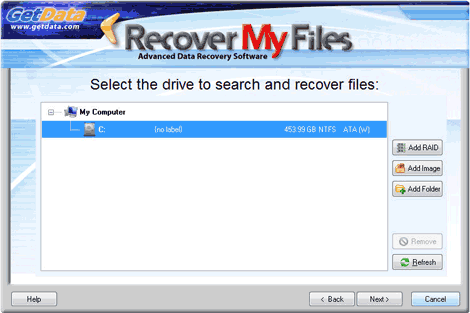 When running a "Recover Files" search, select and search the drive letter on which the files were lost.
This search is "Recommended" because:
Following a file deletion, subsequent activity on the computer may lead to File System records for these files being destroyed. A "Lost File" is a file that has been deleted which no longer has a Filesystem record (e.g. and entry in the Microsoft FAT or MFT), but the content of the file remains on the disk and can be recovered.
Recover My Files does a sequential search of the disk to identify "Lost Files" by their internal file structure, (i.e. their header, content and footer). This is often referred to as a "file header search" or "data carving".
Lost Files do not have a file name (as file names are held only in the file system records and not with the file data) and are called "LostFile_FileType_X".
It is suggested that this search be run when:
(All credit of this software is www.recovermyfiles.com)
- individual files have been deleted and emptied from the Windows Recycle Bin;
- files have been deleted and bypassed the Windows Recycle Bin;
- files have been deleted by a virus, trojan or worm;
- a file of the same name has saved over another important file;
- files have been lost by some other unknown cause.
Selecting the drive to recover Download Current Version: 5.2.1.1964
The next wizard screen performs a scan to identify the devices (hard drives, digital camera, USB drive etc) that are connected to your computer. Select the device you wish to search by clicking it with you mouse to high-light it.Search for Deleted Files (Recommended)
A Deleted File is a file that has been emptied from the Recycle Bin and marked as deleted by the Filesystem, but which retains sufficient information held in the Filesystem to be recovered.This search is "Recommended" because:
- It will rapidly scan the File System for deleted files (the search will take less that 1 hour on a standard home PC);
- If files were recently deleted, there is a high probability of success;
- Files located will have their original file names and folder structure intact.
Search for Deleted Files, then search for selected Lost File Types
This search first runs the search for Deleted Files, as described above. It then sequentially scans the remaining area of the disk for "Lost Files".Following a file deletion, subsequent activity on the computer may lead to File System records for these files being destroyed. A "Lost File" is a file that has been deleted which no longer has a Filesystem record (e.g. and entry in the Microsoft FAT or MFT), but the content of the file remains on the disk and can be recovered.
Recover My Files does a sequential search of the disk to identify "Lost Files" by their internal file structure, (i.e. their header, content and footer). This is often referred to as a "file header search" or "data carving".
Lost Files do not have a file name (as file names are held only in the file system records and not with the file data) and are called "LostFile_FileType_X".
It is suggested that this search be run when:
- The recommended "Search for deleted files" option did not find your files;
- When you wish to be certain that all possible data on the drive can be located and recovered.
(All credit of this software is www.recovermyfiles.com)


0 comments:
Post a Comment