Showing posts with label Password Recovery Tools. Show all posts

Monday, November 17, 2014

Computer Lock Up postheadericon

Computer Lock Up lock your PC when leaving it and prevent unauthorized access! Set the unlock password that cannot be bypassed in safe mode or ignored by a user with administrative rights. The smart software locks keyboard shortcuts, mouse, CD/DVD drives and screen.

Click Here & Download Free

Why to use Computer Lock Up ?

Protect your PC from unauthorized usage !
Whether you want to lock out snooping co-workers, protect yourself from data leaks, or make sure your unsaved work won't be lost - Computer Lock Up is exactly what you need. Set the unlock password and enjoy the new level of security! The software offers advanced capabilities beyond the basic access restriction, which include locking keyboard shortcuts, mouse, CD/DVD drives and screen. Thanks to these features you can now leave your computer unguarded in a room with your toddler or pet without worrying about coming back to an awkward Facebook status or a data disaster.
Best way to lock your computer safely !
Unlike the basic Win+L, Computer Lock Up won't let a user with administrative privileges invade your privacy and interfere with your work unlocking your PC. The program has all the security loopholes closed, ensuring that nobody - and not even administrator - can use your computer without providing the correct unlock password you've set. With Computer Lock Up there is only one password and you are the only one who knows it.
Lock out snooping co-workers !
To protect your privacy even further, the software features startup lock option allowing you (as the name implies) to lock your computer at startup. Such a lock cannot be bypassed in safe mode, so you can be sure that some casual snooper won't be able to read your email or pull a prank on you using this little trick. What's more, the smart program will notify you if someone has tried to break in.
Protect your privacy and avoid data disaster !
With Computer Lock Up it is easy to check if anybody tried to login while you could not see it. You can also hide password promt box for so-called "blind" unlocking, turn on automatic lock under certain conditions, use multi-user (corporate) mode and enjoy other benefits. Your computer can also be transformed into a presentation machine if you choose to create cycling lock screen images.

Features and benefits

  • Quick and safe computer lock by hot key, or mouse click
  • Autolock when computer is idle
  • Correct Ctrl+Alt+Del lock
  • Bulletproof startup lock (couldn't be bypassed in safe mode)
  • Different installation mode - setup for home or corporate use
  • CD/DVD-ROM doors lock
  • Multi-user support
  • Multimonitor support
  • Auto turnoff when computer is locked for a long time
  • Blind password option
  • Stealth mode
  • Windows XP x64 compatibility
  • Custom lock screens
  • Cycling lock screen images
  • Screen saving effects
  • Lock screen transparency - you can view movies under the locked screen
  • Password protected settings, quit and uninstall
  • Command line options
  • and many more

User interface

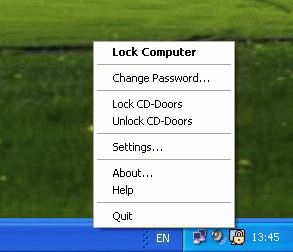
When the program is launched, an icon which looks like a lock appears near the clock at the right side of the taskbar. The program menu is activated by right-clicking on this icon. Through the program menu, you can quickly lock your computer, open the program settings or get help information.
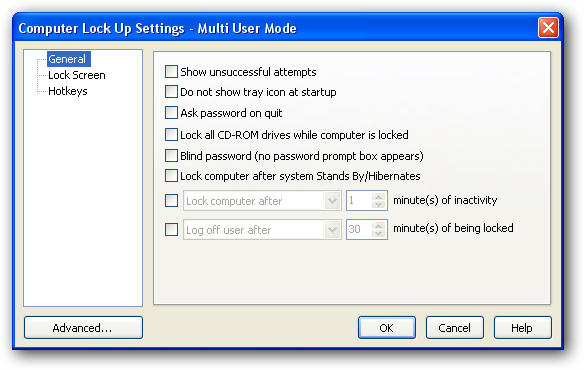
With the Computer Lock Up Settings dialog you can view and change the General options, assign Hotkeys, choose the Lock Screen:
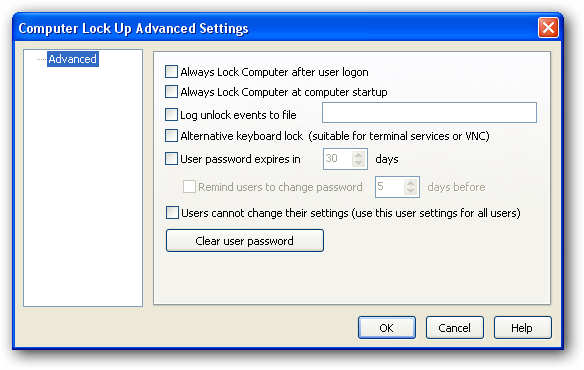
Advanced Settings dialog lets you change Computer Lock Up autostart policy, password expiration period and other advanced settings.
 

System requirements

  • The program runs under Windows 9x / ME / 2000 / XP / Vista / Windows Seven
  • You must have administrative privileges to install Computer Lock Up.
(This Software owned by www.rixler.com)

Chrome Password Recovery Master postheadericon

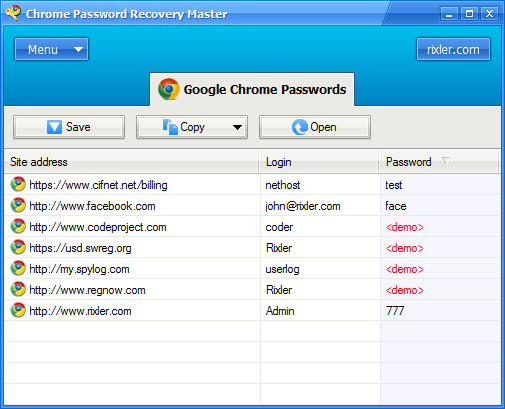
Chrome Password Recovery Master is a program that displays logins and passwords for protected sites stored by Google Chrome browser.


Click Here & Download Free

Overview

Chrome Password Recovery Master is a program enabling you to retrieve your login data stored by Google Chrome web browser. An easy-to-use password recovery solution, the software extracts user names and passwords and displays them in a user-friendly format.
Being one of the most popular web browsers, Google Chrome provides some handy features to save your time and effort, which include storing your login data. Developed to spare you the trouble of re-typing username and password every time you visit the website, it can actually get you trapped if you need to extract this information for some reason. Sometimes you can reset a password; however, it's not always an option, especially if you can't remember the answer to your security question or just want to keep your old password. Chrome Password Recovery Master provides the quick way out of this seeming dead end, allowing you to enjoy the convenience of storing your password and retrieve it when you need it.
The software enables you to instantly recover your logins and passwords stored in Google Chrome. No matter how strong a password is, Chrome Password Recovery Master will restore it so that you could use it for another browser or app, or on a different computer. Thanks to multilingual password support you'll be able to regain access to login data in any language. Retrieved login data (including website addresses) is stored in a formatted text file and can be copied to clipboard. To make sure that your precious data don't end up in wrong hands, you can set access password to prevent unauthorized program execution.

Features and benefits

  • Recovers passwords for protected sites stored by Google Chrome browser;
  • Instant recovery of site passwords of any length and complexity;
  • Support for multilingual passwords;
  • Allows to set the access password to prevent unauthorized program running;
  • Stores retrieved information in a formatted text file;
  • Allows to copy retrieved information to clipboard;
  • Easy and user-friendly interface.

User interface

When you run the program, it retrieves all logins and passwords for protected sites, and shows them in the Google Chrome Passwords list. So, by running the program you can get all retrieved information immediately.


System requirements

  • Windows 9x, ME, 2000, XP, 2003, Vista, Seven..
  • The program supports Chrome v5.x, v6.x, v7.x, v8.x
(This Software owned  by  http://www.rixler.com)

Instant Messengers Password Recovery Master postheadericon

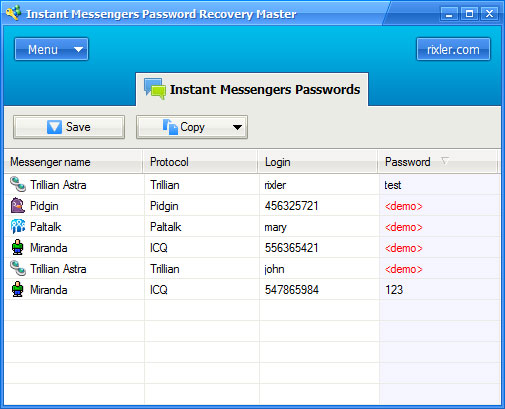
Instant Messengers Password Recovery Master is a program that displays logins and passwords for instant messengers accounts stored by Windows Live Messenger, ICQ, MSN Messenger, Yahoo! Messenger, Trillian, Trillian Astra, Miranda, GAIM, Pidgin, SIM, R&Q, AIM, AIM Pro, QIP, PSI, FAIM, Paltalk, Google Talk, Excite Private Messenger, MySpaceIM, IM2.
Click Here & Download Free

Overview

Instant Messengers Password Recovery Master will recover a lost or forgotten account password for your instant messenger. The only condition is that this password should be cashed by the messenger. If it is, the lost password will be back to you!
The password is recovered instantly when the program is started. Users won’t have to rack their brains over the recovery settings because the program’s artificial intelligence is smart enough to choose the best recovery method on its own. Whether the password is too long or too complex, Instant Messengers Password Recovery Master will restore it without any problems. Unlike some other recovery software, it can also recover passwords that have been written in a non-English language. If you have, for example, a password in German, it’ll be recovered too.

Features and benefits

  • Recovers instant messengers passwords stored by Windows Live Messenger, ICQ, MSN Messenger, Yahoo! Messenger, Trillian, Trillian Astra, Miranda, GAIM, Pidgin, SIM, R&Q, AIM, AIM Pro, QIP, PSI, FAIM, Paltalk, Google Talk, Excite Private Messenger, MySpaceIM, IM2;
  • Instant recovery of instant messengers passwords of any length and complexity;
  • Support for multilingual passwords;
  • Allows to set the access password to prevent unauthorized program running;
  • Stores retrieved information in a formatted text file;
  • Allows to copy retrieved information to clipboard;
  • Easy and user-friendly interface.

User interface

When you run the program, it retrieves all instant messengers logins and passwords, and shows them in the Instant Messengers Passwords list. So, by running the program you can get all retrieved information immediately.


System requirements

  • Windows 9x, ME, 2000, XP, 2003, Vista, Seven.
  • The program supports mostly all versions of instant messengers.
(This Software owned  by  http://www.rixler.com) 

Excel Password Recovery Master postheadericon

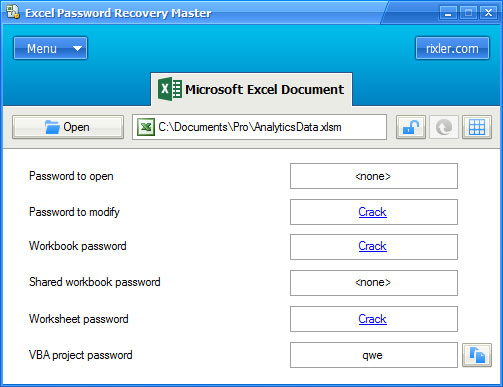
Excel Password Recovery Master removes or restores passwords set to MS Excel spreadsheets so you don’t have to play the guess game with your crucial documents. Importantly, the program crack multiple passwords at once, so whenever you load an Excel document and click Crack!, all passwords will be momentarily restored. The tool supports all major versions, all types of passwords and is extremely friendly.

Click Here & Download Free

Masterly MS Excel Password Recovery

Password protected Excel documents are not rare in the business world. Unfortunately, aside from keeping your spreadsheets unavailable to unauthorized persons, this also may lead to a trouble if you lost or forgotten the access password. Without the password you can’t open the document, but picking this digital lock by typing random variants coming to your mind is neither an option.
Instead of wasting time trying to guess the correct password, try our Excel Password Recovery Master! This special tool hacks the password to an Excel document with absolute minimum efforts. And since the recovery tool supports all major versions of Microsoft Excel (97/2000/XP/2003/2007 and 2010), you can restore access to all of your Excel workbooks and spreadsheets regardless of the actual document format.
Excel Password Recovery Master implements a “hi-tech” way to restore passwords to Excel 97/2000/XP/2003 documents. In particular, the app connects to a special password cryptographic server and deciphers the given authorization information almost instantly thanks to the computational power of the cloud. While many tools ask you to send the entire document to a server to crack them, Excel Password Recovery Master only needs few kilobytes of data, which is essential when dealing with large amounts of protected files. The data required to find the password are sent to the server, which then returns a decryption key that is used to remove password protection from the document and restore access to it.

Key benefits of using Excel Password Recovery Master

  • Excel Password Recovery Master restores access to MS Excel documents by restoring or removing passwords from them.
  • The program supports Microsoft Excel 97/2000/XP/2003/2007 and 2010 (read about supported MS Excel versions below for the detailed info).
  • You can remove multiple passwords from Excel documents with one click.
  • Crack all types of Excel passwords (open [1], modify, workbook and worksheet passwords, plus VBA project passwords).
  • The special password server delivers almost instant recovery of a password to open in MS Excel 97/2000/XP/2003 documents.
  • Simple and exceptionally laconic interface.
  • The interface supports English, German, French, Spanish and Russian languages.
  • A master password keeps the tool from use by unauthorized persons.
  • Deal with recovered passwords easily: copy to clipboard or save for later use.

One-click Recovery of MS Excel passwords

Regardless of the length or strength of an MS Excel password, Excel Password Recovery Master can crack it almost instantly. If you cannot edit or even open a document, because you don’t remember the password you used to protect it, don’t worry – you are literally few clicks away from restoring the access to your information.
First of all, open the document you want to recover the password for. Currently, the tool supports XLS, XLT, XLA, XLSX, XLSM, XLTX, XLTM, XLSB, XLAM formats. Next step – click the crack button on the toolbar next to the document name. Finally, wait until the program automatically finds and breaks all passwords in the opened Excel document and displays them on the screen. And that won’t take too long thanks to the unique password server feature. Simply speaking, the function uses a remote server to crack the password to open Excel 97/2000/XP/2003 document if such password exists. Normally this operation would take quite long, but the usage of the server allows performing it very quickly.
Once passwords are recovered, you can instantly copy them to the clipboard. Note that you can also recover some individual passwords too. In particular, Excel Password Recovery Master can remove or (if possible) restore a password to open, a password to modify, a workbook password, a shared workbook password, a password of individual worksheets, and a VBA project password.
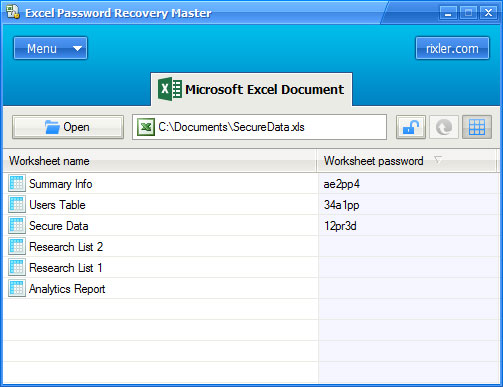
To recover passwords of individual worksheets, click the spreadsheet icon on the toolbar to display the list of available worksheets in the opened document, then click the crack button on the toolbar. The program will automatically remove or recover passwords for all worksheets in the workbook.

Of course, just like with other types of passwords you can easily copy recovered worksheet passwords to the clipboard.


Supported MS Excel versions

Excel Password Recovery Master supports workbooks and worksheets saved in Microsoft Excel 97/2000/XP/2003/2007 and 2010. A password to open set in MS Excel 97/2000/XP/2003 documents requires a connection to the password server.
Note that some passwords are restored, while others are removed. This depends on the MS Excel version. Please refer to the below table to see if a certain password can be recovered or removed using Excel Password Recovery Master.
Password Type MS Excel Version *
Password recovery Password removal
Password to open X 97/2000/XP/2003
Password to modify 97/2000/XP/2003 97/2000/XP/2003/2007/2010
Workbook password 97/2000/XP/2003 97/2000/XP/2003/2007/2010
Shared workbook password 97/2000/XP/2003 97/2000/XP/2003/2007/2010
Worksheet password 97/2000/XP/2003 97/2000/XP/2003/2007/2010
VBA project password 97/2000/XP/2003/2007/2010 X
The program does not support MS Excel 97/2000/XP/2003 documents protected with non-standard Crypto Service Provider.
[1] Recovery or removal of the "open" password for MS Excel 2007 / 2010 documents is not supported by the program.
(This Software owned  by  http://www.rixler.com) 

Word Password Recovery Master postheadericon

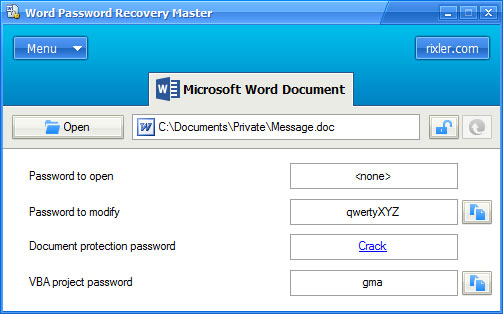
Word Password Recovery Master resolves the common issue – a lost or forgotten Word password. It supports all versions of the app, all kinds of password, and the cracking process end-to-end usually take no more than 10 seconds thanks to secure online password server. This server cracks the password hidden in the Word document and unlocks data inside. The tool supports MS Word 97-2010 documents and is excitingly easy to use.

Universal password cracker for MS Word documents

Microsoft Word documents can be protected with passwords if you want the contents to remain secure, unavailable for others or non-editable with permission. However, you may fall a victim to your own forgetfulness if you manage to lose a password locking your Word documents. In that case, you need Word Password Recovery Master.
This tool in merely few seconds will recover all passwords in a Word document including a password to open, a password to modify, a document protection password, and a password that locks the VBA project of this document. Even better, the process is fully automatic and all passwords are restores in just one run.
Word Password Recovery Master allows almost instantly break passwords for Word 97/2000/XP/2003 documents. The high cracking speed compared to competitors is caused by the special online password server. The program sends encryption data of a document to the server; the server analyzes it and returns the decryption key. Importantly, the tool doesn’t send any contents of the document, so this affects neither your privacy nor your bandwidth.
In addition you can protect the program itself by assigning a secret administrator password to Word Password Recovery Master, so it would allow to recover Word passwords to authorized persons only.

Key benefits of using Word Password Recovery Master

  • You can recover and remove MS Word 97/2000/XP/2003/2007/2010 passwords (read the detailed information in the “Supported MS Word versions” section).
  • You can break multiple MS Word passwords in one go.
  • You can crack a password to open, a password to modify, a document protection password, a VBA projects password in Microsoft Word documents.
  • With the use of the password server you can remove password to open in Word 97/2000/XP/2003 documents in just 10 seconds.
  • You can set a password to restrict access to cracking functions.
  • Any password you recover can be easily copied to the clipboard.
  • The interface of the tool is absolutely intuitive and doesn’t need any special skills to use the program.

Easy way to recover lost MS Word passwords

With a serious password recovery capability under the hood, Word Password Recovery Master is extremely easy to use. Open the document that needs to be cracked, click the Crack button on the toolbar. The rest is done automatically in the matter of seconds. All types of passwords will be recovered and shown on the screen.
If you urgently need to open a document, and asks for a password you don’t know, use Word Password Recovery Master to crack it. May be you need to discover the password blocking you from making changes in the file? The program can handle this problem too. Password-protected VBA projects can also be processed and successfully cracked with just one click.

Conveniently, you can recover or remove each password individually, or crack all of them at once. And any recovered Word password can be copied to the clipboard in a snap to quickly open the document you need to access.


Supported MS Word versions

The program needs to connect to the password server in order to remove a password to open in MS Word 97/2000/XP/2003 documents.
Note that depending on the version of Microsoft Word the file is created in, some passwords can be recovered while others – cannot. The below table shows what types of passwords can be recovered and removed with Word Password Recovery Master.

Password Type
MS Word Version *
Password recovery
Password removal
Password to open
X
97/2000/XP/2003
Password to modify
97/2000/XP/2003
97/2000/XP/2003/2007/2010
Document protection password
X
97/2000/XP/2003/2007/2010
VBA project password
97/2000/XP/2003/2007/2010
X

* The program does not support MS Word 97/2000/XP/2003 documents protected with non-standard Crypto Service Provider.

Office Password Recovery Toolbox postheadericon

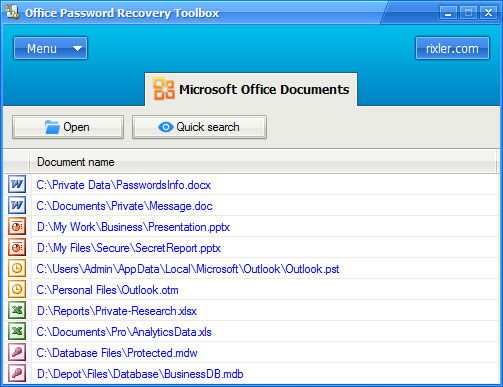
Office Password Recovery Toolbox comes to the rescue, when you have lost a password to any Microsoft Office document. Few clicks, a dozen of seconds, and your document is unlocked, and the password protecting it is displayed on the screen. The program supports MS Word, Excel, Outlook, PowerPoint and Access files as well as VBA projects. The quick search feature allows you to restore passwords to recently opened MS Office documents.

Comprehensive solution for recovering lost MS Office passwords

Cracking passwords is not necessarily what only villain hackers do; we, ordinary people often need to recover some lost passwords too. A text document, a password protected spreadsheet, or a business presentation your boss needs tomorrow – accessing the information inside is impossible if the password locking it is lost. However, losing a password doesn’t mean you have to lose the information too.
Office Password Recovery Toolbox is a versatile utility to quickly recover any number of passwords in any Microsoft Office documents including Word texts, Excel spreadsheets, PowerPoint presentations, Outlook documents and Access databases. Using the tool is easy thanks to the superb non-overloaded interface, and cracking a password takes virtually few moments.

What’s inside?

  • Instant removal or recovery of all passwords from MS Word, MS Excel, MS Outlook, MS PowerPoint and MS Access documents and VBA projects.
  • Super-simple and intuitive multi-lingual interface.
  • The support for Office 97/2000/XP/2003/2007/2010 (see detailed information in the table below).
  • Ability to cracks passwords to open, passwords to modify, document protection passwords, VBA projects passwords, workbook and worksheet passwords (Excel only), database and user workgroup passwords (Access only).
  • Quickly unprotect recently opened password-protected Microsoft Office documents directly upon startup.
  • Access to the unique password server that immediately breaks MS Word and MS Excel 97/2000/XP/2003 passwords to open regardless of length and strength.
  • 100% safety to information in your documents.
  • Ability to protect Office Password Recovery Toolbox itself with a password to prevent unauthorized access.

Quickly crack forgotten MS Office passwords

Office Password Recovery Toolbox provides a simple and efficient way to restore access to MS Office documents. The first step is to open a document or let the program search for recent Office documents opened on your computer. All documents found will be displayed in the window alongside with the type of each document and a path to it.
Click a document in the list to switch to the password recovery mode. Now just click the Crack button on the toolbar and let the tool do all the rest. The whole process takes few seconds and restores all the passwords the chosen document has. Note that you can also crack individual passwords using the corresponding link just next to the password box.
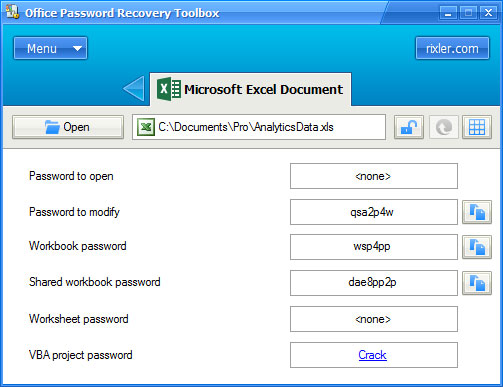
To copy recovered passwords to the clipboard click the button just right of the password box.
Microsoft Excel documents may contain passwords for individual worksheets, and Microsoft Access databases can have workgroup passwords. Office Password Recovery Toolbox displays a special toolbar button in such cases, so you can view those passwords too.


Supported MS Office versions

Office Password Recovery Toolbox can remove or recover passwords of Word, Excel, Outlook, Access and PowerPoint files. Passwords are either recovered and then are shown on the screen, or are simply removed which makes documents unprotected.
Hacking of passwords to open MS Word 97/2000/XP/2003 and MS Excel 97/2000/XP/2003 documents requires a connection to the Password Server.
Note that some document versions do not allow recovering or removing passwords of certain types. Below you find a table that shows what types of passwords can be recovered or removed by Office Password Recovery Toolbox.

Microsoft Word

Password Type MS Word Version *
Password recovery Password removal
Password to open X 97/2000/XP/2003
Password to modify 97/2000/XP/2003 97/2000/XP/2003/2007/2010
Document protection password X 97/2000/XP/2003/2007/2010
VBA project password 97/2000/XP/2003/2007/2010 X

Microsoft Excel

Password Type MS Excel Version *
Password recovery Password removal
Password to open X 97/2000/XP/2003
Password to modify 97/2000/XP/2003 97/2000/XP/2003/2007/2010
Workbook password 97/2000/XP/2003 97/2000/XP/2003/2007/2010
Shared workbook password 97/2000/XP/2003 97/2000/XP/2003/2007/2010
Worksheet password 97/2000/XP/2003 97/2000/XP/2003/2007/2010
VBA project password 97/2000/XP/2003/2007/2010 X

Microsoft PowerPoint

Password Type MS PowerPoint Version
Password recovery Password removal
Password to open X X
Password to modify X 2007/2010
VBA project password 2007/2010 X

Microsoft Outlook

Password Type MS Outlook Version
Password to open (for PST files) 97/2000/XP/2003/2007/2010
VBA project password (for OTM files) 97/2000/XP/2003/2007/2010

Microsoft Access

Password Type MS Access Version
Password to open (for MDB files) 97/2000/XP/2003
Password to open (for ACCDB files) X
User passwords (for MDW files) 97/2000/XP/2003
* MS Word and MS Excel documents protected with non-standard Crypto Service Provider are not supported by the program.
(This Software owned  by  http://www.rixler.com) 

Firefox Password Recovery Master postheadericon

Firefox Password Recovery Master is a program that displays logins and passwords for protected sites stored by Firefox and Mozilla browsers.


 Overview

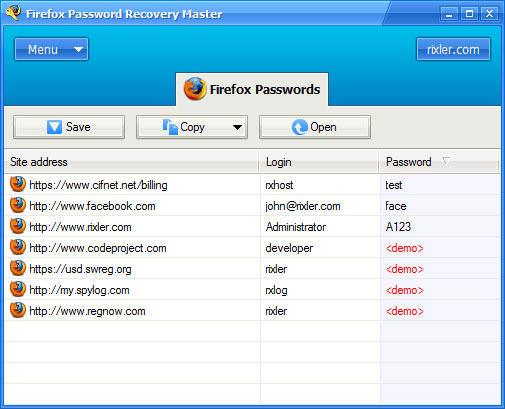
Firefox Password Recovery Master presents itself as a handy tool enabling you to restore any cached passwords for such popular web browsers as Mozilla and Mozilla Firefox. The program will provide you with the list of website passwords straight after you start it.
Firefox Password Recovery Master is very convenient as it provides all the passwords instantly, regardless to their length and complexity. You will certainly appreciate that the utility can both recover passwords typed in any language and easily restore multilingual passwords. Using this helpful utility you can immediately restore passwords for websites, requiring access passwords and even decrypt passwords protected with the User Master Password.
The program interface is pretty simple and comes with such useful features as copying of the retrieved data to clipboard and saving it in a formatted text file, so you won’t lose it again. If you want to be sure that no one else uses Firefox Password Recovery Master while you are away you can set an access password and prevent any unauthorized program start

Features and benefits

  • Recovers passwords for protected sites stored by Firefox and Mozilla browsers;
  • Decrypts passwords protected with the User Master Password;
  • Support for multilingual passwords;
  • Allows to set the access password to prevent unauthorized program running;
  • Stores retrieved information in a formatted text file;
  • Allows to copy retrieved information to clipboard;
  • Easy and user-friendly interface.

User interface

When you run the program, it retrieves all logins and passwords for protected sites, and shows them in the Mozilla Firefox Passwords list. So, by running the program you can get all retrieved information immediately.


System requirements

  • Windows 9x, ME, 2000, XP, 2003, Vista, Seven.
  • The program supports Firefox v1.x, v2.x, v3.x and Mozilla v1.7.x.
(This Software owned  by  http://www.rixler.com) 

Zip Password Recovery Master postheadericon

Zip Password Recovery Master helps to recover lost passwords for ZIP archives. It supports a number of exclusive attacks to beat zip passwords. The use of undocumented features of ZIP files provide you with a great time reduction while searching the password.

Recover Zip password if you have lost it

Today Zip Password Recovery Master provides probably the most complete set of attacks for recovering passwords to Zip archives. It includes the standard Brute-Force and Dictionary attacks as well as some additional types of attacks: “Plain-text attack”, “Guaranteed attack”, “False-type attack”, “Template attack” and “Multi-computer brute-force attack”. Besides, the search rate for all types of attacks is very high, especially on Intel platforms. But the most interesting thing is the original solution – “Automatic mode”. When this mode is selected, Zip Password Recovery Master selects the optimal strategy for the password search, alternates various types of attacks with various settings to find the valid password. In 90% of all cases the actual password will be found within several dozens of minutes after the beginning of an attack. But if you are not lucky, do not give up and try other types of attacks.

Features and benefits

  • The program is smart enough to not give you "wrong" matches, as many other do. If it says that the password is here, then it really is.
  • High speed of work.
  • The wordlist mounting to 450,000 real English words.
  • Ability to operate in the background.
  • Ability to check passwords manually.
  • Heuristic analysis.
  • Interrupting the program at any time and resuming its execution later from the same point.
  • User friendly interface.
  • Customizability. You can set the password length (or length range) and the set of characters to be used to generate the passwords.
  • Equally high speed for any amount of files in the archive.
  • Various types of attacks.
  • Used as Screensaver. 

User interface

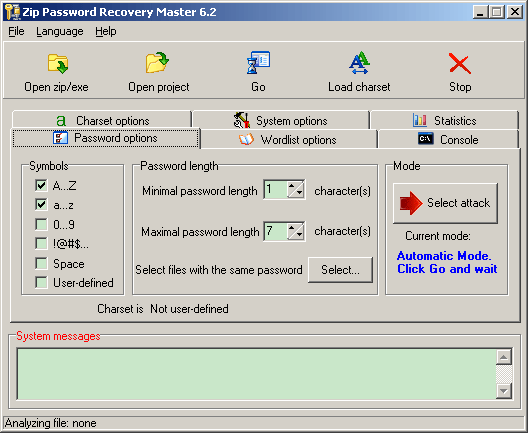
To start recover the Zip password you need to open Zip archive file (*.zip or *.exe) using the "Open zip/exe" button, and click the "Go" button, Zip Password Recovery Master will start the password search in automatic mode.


  System requirements
  • Windows 9x / ME / NT / 2000 / XP / 2003.

  • The program was completely tested with the following archives: WinZip 6.x - 8.x for Windows (Nico Mac Computing), PkZip 4.x for MS-DOS (PKWARE) and WinRar 2.8 (Eugene Roshal). 
(This Software owned  by  http://www.rixler.com) 

Email Password Recovery Master postheadericon

Email Password Recovery Master is instant recovery of lost or forgotten passwords wrapped into a straightforward minimalistic interface. The program recovers email passwords to mailboxes stored in many e-mail clients including Thunderbird, Outlook and The Bat!, and all popular web browsers (Chrome, Firefox, IE and Opera are supported). Fast, user friendly and functional tool allows you to restore access to your email accounts in a minute.

Recover lost email account passwords easily

Over 150 billions of e-mail messages are sent worldwide every day. We send and receive e-mails for business and for fun, for education and for talks. We also receive many confirmation e-mails holding our passwords, authorization data, special offers and important reminders. Whether you use a software e-mail client, or prefer one of popular online e-mail accounts, losing a password to your mailbox would be a disaster! Not only you suddenly have no access to your conversations, you may potentially lose much more important data: login data to various websites, social network passwords, private information you wouldn’t want to share and so on.
Email Password Recovery Master instantly fixes the problem before it goes too far. The program recovers passwords to all popular local e-mail clients and e-mail account passwords stored in many popular browsers. With few clicks you can restore access to your mailbox once you have lost or forgotten the password.

Features and benefits

  • Instantly recovers passwords to your mailboxes
  • Supports passwords of any length and complexity.
  • You can recover e-mail passwords in the following software email clients: Windows Live Mail, Mozilla Thunderbird, Outlook, Outlook Express, The Bat!, Becky, PocoMail, Forte Agent.
  • You can also restore e-mail account passwords in all popular browsers including Internet Explorer, Google Chrome, Mozilla Firefox, Opera.
  • Easily copy the restored password to the clipboard or save all of recovered passwords to a text file
  • Assign a supervisor password to block unauthorized access to password recovery functions.
  • Laconic interface for extreme user friendliness.

Password recovery for Email clients

Email Password Recovery Master can restore access to all of your mailboxes in popular e-mail clients in several minutes. Indeed, the process is absolutely easy and intuitive. The program scans the system for installed e-mail software, parses its configurations and recovers all passwords found.
Basically, in most cases you should merely run the program to get your lost e-mail passwords back! After that you can either save them to an external file, or copy a given password to the clipboard to immediately login to your account.

The program supports such popular e-mail clients as Outlook and Outlook Express, Mozilla Thunderbird, The Bat!, Becky and others. Whatever your e-mail client is, and whatever type of the mail protocol you use (POP3/SMTP or IMAP), Email Password Recovery Master instantly solves the issue!

Password recovery for Web browsers

Many users prefer web mail clients to deal with upcoming messages. Indeed, plenty of free space, convenient filters and built-in anti-spam options make online web clients very competitive and de facto preferable today. Email Password Recovery Master helps you retain the access to your mailbox if you have forgotten a password.
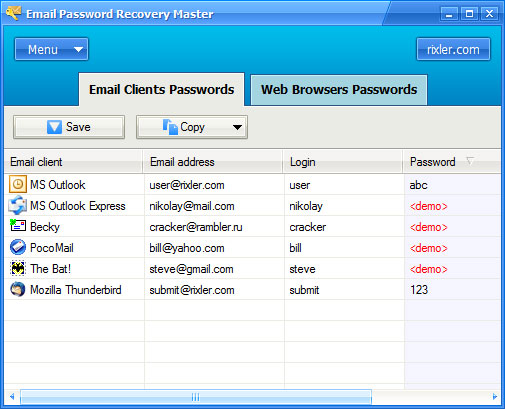
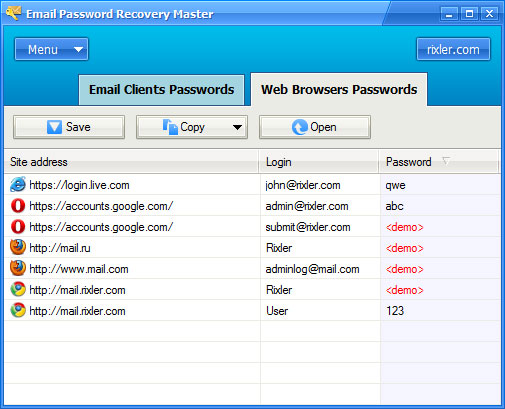
In particular, the program scans the system for installed browsers and stored passwords to e-mail services like Mail.com, live.com, Google Mail and instantly recovers them. The process as simple as running an app: once you launch Email Password Recovery Master and switch to the Web Browser Passwords tab, you’ll find all the available passwords already restored and listed on the screen. This literally takes few seconds!
Like with local e-mail client passwords, you can copy the recovered authorization data to the clipboard or save them to a file. Also, you can open the link and try logging in with the recovered password right away.


System requirements

  • The program runs under Windows 2000 / XP / 2003 / Vista / 7 / 8.
  • Supports mostly all versions of email clients and web browsers.
(This Software owned  by  http://www.rixler.com) 

Facebook Password Recovery Master postheadericon

Facebook Password Recovery Master recover lost or forgotten Facebook logins and passwords stored in an Internet Explorer, Firefox, Chrome or Opera browser. Just run the program to get the list of all the logins and passwords for the Facebook accounts lost in your computer.   
               Download Here

Overview

Without a valid password, you cannot exchange messages with your old and new friends, find out what's new in their lives or tell them something important. You also cannot participate in your favorite common interest groups and do other interesting things over Facebook. How can you recover your Facebook password if you have forgotten it and are unable to reset it for one or the other reason? - Take advantage of this simple fix!
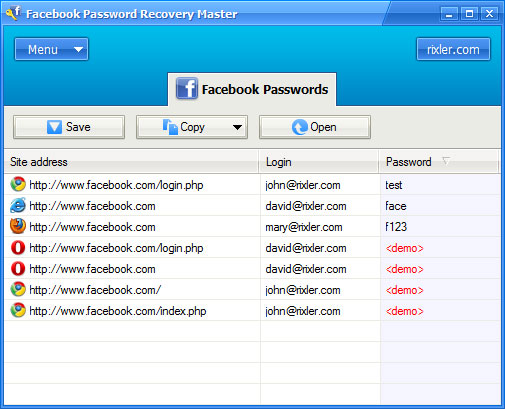
Facebook Password Recovery Master instantly recovers lost Facebook logins and passwords stored in an Internet Explorer, Firefox, Chrome or Opera browser. All it takes to recover all the lost passwords at once is to run the recovery master; that's it. The program automatically retrieves all the logins and passwords for the Facebook website that got lost in your computer, regardless of their length and complexity, and lists them on the screen. You can click on one or several entries and copy those to clipboard, open the Facebook login page in the corresponding web browser or export the recovered data to a formatted text file. To prevent unauthorized access to sensitive data, the software can be password-protected from unauthorized use; this way, it will prompt you for the access password every time you run it and won't allow unauthorized users to use it.
Facebook Password Recovery Master allows to recover passwords typed with both English and national characters, as well as combinations of those, and demonstrates stable work under all versions of Windows, beginning with as old as 9x and going through the latest Windows 7. Supports the latest versions of Internet Explorer, Mozilla Firefox, Google Chrome, and Opera browsers.

Features and benefits

  • Recovers Facebook passwords stored by Internet Explorer, Mozilla Firefox, Google Chrome, Opera.
  • Instant recovery of Facebook passwords of any length and complexity.
  • Support for multilingual passwords.
  • Stores retrieved information in a formatted text file.
  • Allows to copy recovered logins and passwords to clipboard.
  • Allows to set the access password to prevent unauthorized program running.
  • Easy and user-friendly interface.

User interface

When you run the program, it retrieves all logins and passwords for the Facebook accounts ( http://www.facebook.com), and shows them in the Facebook Passwords list. So, by running the program you can get all retrieved information immediately.


System requirements

  • Windows 9x, ME, NT, 2000, XP, 2003, Vista, 7.
  • The program supports the latest versions of Internet Explorer, Mozilla Firefox, Google Chrome and Opera browsers.
(This Software owned  by  http://www.rixler.com) 


Internet Password Recovery Toolbox postheadericon


Internet Password Recovery Toolbox helps you recover all email, internet, browser, messenger, FTP, LAN and dial-up passwords stored in your system, even if you don’t know whether or not they are here! The program is 100% automatic, so all you need to do is to launch the application – all passwords to websites, e-mail accounts and instant messengers will be right on the screen then. Instantly!

Download

Password recovery solution for Web-related applications

The whole world goes online today. Thousands of website require some kind of authentication or simply login. The more you surf, the more user names and passwords you have to keep or memorize. Browsers, e-mail clients, online games, instant messengers, social network widgets, various cloud-based productivity tools – all these options can suddenly become inaccessible if you lose or forget corresponding passwords.

Surely, many services have the “I forgot my password” form, but some Internet passwords cannot be recovered this way, not to say about time needed to recover passwords one by one. Internet Password Recovery Toolbox easily resolves the forgotten password problem by restoring all and every Internet passwords at once! Regardless of the aspect of your internet activity, you can rest assured the password to almost any internet application isn’t lost forever. It is only matter of seconds for Internet Password Recovery Toolbox to bring it next to your eyes again.

Even better, the process takes merely a blink. Once you run the tool it recovers anything it could find saving your time. Thanks to the polished interface and reliable operation, Internet Password Recovery Toolbox is one of the simplest Internet password crackers on the market. Add it to your arsenal and never worry about forgotten passwords anymore! 

Features and benefits

  • Recovers passwords for Internet Browsers: Internet Explorer, Mozilla Firefox, Google Chrome, Opera.
  • Provides password recovery for IMs: Trillian, Miranda, Pidgin / GAIM, Paltalk.
  • Supports all popular Email Clients: Windows Mail, Windows Live Mail, Outlook, Outlook Express, The Bat!, Becky, PocoMail, Mozilla Thunderbird, Forte Agent.
  • Password recovery for FTP Clients: CuteFTP, FlashFXP, SmartFTP, BulletProof FTP, Total Commander, Far Manager, WS_FTP, FileZilla, FTP Commander, TurboFTP, FFFTP, Core FTP, FTP Explorer, Directory Opus.
  • Recovers Network and Dial-up account passwords. Crack logins and password both for internet access and for LAN. Retrieves Network and Dial-up passwords for ALL the users of Windows 2000/XP/Vista/7/8;
  • Instant password recovery.
  • Master password restricts unauthorized access.
  • Export restored passwords to a text file or copy to clipboard.
  • Apparent UI.

How to recover lost Internet passwords

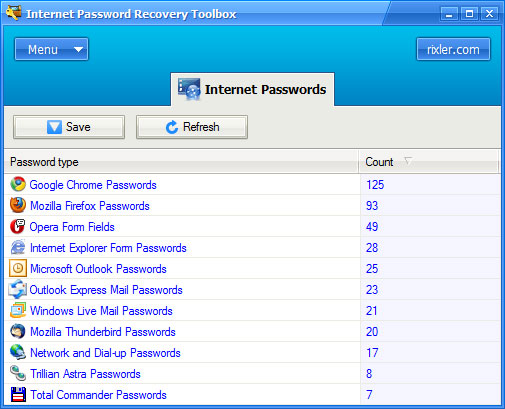
Recovering lost internet password with Internet Password Recovery Toolbox is so easy that it may even be confusing for the first time. Literally all you need to recover all Internet passwords your computer stores, is to run the program. That’s it! Just run it. The tool automatically scans your system for few seconds and extracts all passwords for any Web-related applications.

All passwords recovered this way are grouped together, so you can look at and restore passwords for any given application.
Click the Save button to save restored passwords to a text file, or click any given category to open the list of passwords stored by this application. For instance, let’s click on Internet Explorer passwords. The window changes and displays all login data ever typed and saved by Internet Explorer.
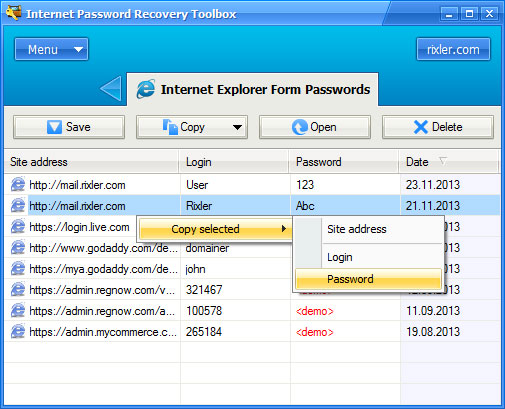
You can copy website URL, login or password to the clipboard by right-clicking a site in the list. Toolbar buttons allow you to export password from this category to a text file or to the clipboard. Note that you can also delete passwords if you don’t want this application to store them anymore.

To return to the list of passwords, click the back button next the tab name.


System requirements

  • Windows NT / 2000 / XP / 2003 / Vista / 7 / 8.
  • Recovering network and dial-up passwords requires administrator privileges.
(This Software owned  by  http://www.rixler.com) 

Windows Password Recovery Bootdisk postheadericon

Windows Password Recovery Bootdisk will remove the password you can’t remember and thus will allow you to login to your account. The program creates a bootdisk or a bootable USB stick, and writes a special Linux-like OS there. Booting from such disk allows you to remove a Windows account password, or recover its hash for more advanced cracking. You can then restore the removed password if you want.

Create a bootdisk and remove forgotten Windows passwords

The loss of any password is disturbing, but it is a Windows login password that if lost can wreak complete havoc with your work. If you can’t login to the system you can’t open any document, you can’t open a control panel of a website, you can’t confirm a purchase and you even cannot send an e-mail explaining your problem! So how to erase a Windows account password and access your system again?
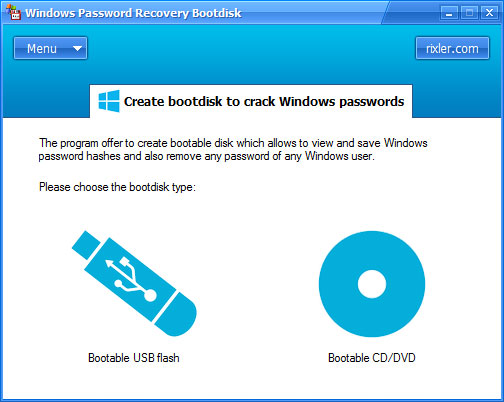
Windows Password Recovery Bootdisk will allow you to log in your account even if you have forgotten the password, and by recovering the hash of the original password it allows you to restore it. The program records a bootable USD stick or CD/DVD disk and loads the system from it. After that it removes a password of the specified user or all of them thus allowing to freely log into those accounts, and recovers hash data for further retrieval of lost passwords.

Features and benefits

  • You can remove all lost Windows passwords or just a particular one.
  • Windows NT/2000/XP/2003/Vista/7/8 are supported.
  • The program shows user names, LM and NTLM password hashes.
  • An independent bootable disk or USB stick is recorded to crack Windows user passwords.
  • Decrypts password hashes encrypted with syskey.
  • Supports IDE / SATA / SCSI hard drives and FAT and NTFS file systems.
  • Safe operation and “fool-proof” interface.

How to unprotect Windows user account using a bootable disk

In order to remove Windows user account password, or retrieve its hash, a reboot to another OS is required. Thanks to Windows Password Recovery Bootdisk you don’t have to use another OS installed on your computer or even have one. You need to create a bootable disk of any kind (CD, DVD, USB) and boot from it. The disk is created in a minute by the program in 100% automatic mode. The image of the disk contains a Linux-like operating system that should boot up your system and provide access to Windows system files. This supplemental operating system is extremely small, merely about 8 Mbs, and it doesn’t require any third-party components.
So, when the disk is created, all you need to do is to restart your system and boot from that disk or USB drive. Note that you may need to enable such type of booting in your BIOS settings. The disk boots up and automatically launches the password restoration application that allows you to remove a password or save its hash to a text file.


Instant Windows password removal

Depending on your computer type and hardware, you may need to explicitly enable booting from CD or USB drive in your BIOS. Or you may simply press F8 or F12 to show the boot device selection dialog.
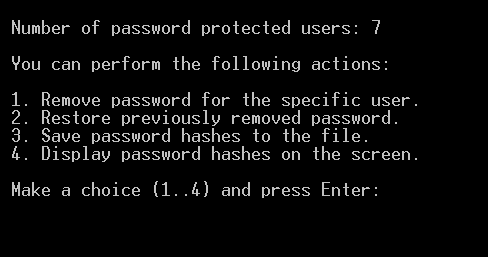
As soon as Windows Password Recovery Bootdisk launches, it displays a menu. You can perform the following actions: remove a password of the specific user account, restore previously removed password (you may need this to get the system password-protected again), save password hashes to a file or display them on the screen.
In most cases, removing a password is enough to make your system available again. You will be able to log in without a password and work as usual. If for some reason you want to get back to previous security settings, select the second menu option and restore the old password. There will be no signs in your system that the password was ever removed.


View and save hashes of Windows passwords

Removing a password allows you to quickly restore access to the system, but often you also need to know the original password. For this case Windows Password Recovery Bootdisk offers an option to view or save Windows password hashes. Technically, a hash is not a password itself. It is just like the table of contents in a book - a short compressed version of what is inside. Instead of comparing passwords upon logon operation, the system calculates and compares hashes of those passwords. This provides additional level of security since the passwords are harder to intercept or log this way.
However, the mathematical nature of a hash has a backdoor that allows to brute-force the password from a hash. Practically, this means that using Windows Password Recovery Bootdisk you can try to recover original passwords from the saved hashes using some third-party crack tool like L0phtCrack. Though, such methods usually take long comparing with mere removal of the password (which goes instantly), so we do not recommend brute-forcing a hash unless you really have to.


System requirements

Windows Password Recovery Bootdisk supports Windows NT / 2000 / XP / 2003 / Vista / 7 / 8.
With the USB flash stick or CD / DVD disk burned by the program you can recover hashes or remove password to user account completely in the above OSes. The program will works with all IDE, SATA and SCSI drives with valid FAT or NTFS files systems.
The bootdisk supports password hashes stored in the local computer's SAM (Security Account Manager) only, Active Directory is not supported.

(This Software owned  by  http://www.rixler.com)