Showing posts with label Typing Tutor. Show all posts

Wednesday, September 17, 2014

Typing Master Pro postheadericon

Touch typing tutor

  • Learn the powerful touch typing technique

  • Double your typing speed to save time

  • Interactive training with a personal approach


Download Free Here

Your Personal Typing Tutor

Meet TypingMaster Pro, the personal touch typing tutor that adapts to your unique needs. The program provides customized exercises and helpful feedback to guide you step by step to professional keyboarding. As a result your typing speed will increase significantly saving you a lot of valuable work time.
Adjusts to Your Progress
At every stage training is adjusted to your personal progress. Weak spots are pinpointed and rapidly eliminated with additional exercises. Thanks to this personal approach you can put your new skills into action after only 3 to 5 hours of training.

The Benefits of Touch Typing

With TypingMaster Pro you can learn the touch typing technique and bring your keyboarding to a whole new level.
Your typing will become as easy and fluent as speaking, enabling you to complete writing tasks with a new level of efficiency. You will save loads of time as you create reports, emails and presentations much faster.
Additionally, you can stop hunting for keys and focus solely on your text and ideas, giving yourself more freedom for creativity.
Accelerate your typing speed
With TypingMaster a novice keyboard user can learn to type many times faster. Clumsy typing will no longer interrupt the flow of your thoughts!
Get rid of typos
Get rid of those annoying typing errors and increase the quality of your texts.
Save valuable work time
Learning to touch type will help save dozens of working hours each year as you type faster and do not need to correct errors constantly.
Focus on your text and ideas
With fluent keyboarding skills you can put your brain power into expressing your thoughts instead of finding the right keys.
Improve your ergonomics
Natural, efficient finger movements and no need to look at the keyboard results in less stress in fingers, arms and neck.
Be confident with computers
Improved typing skills will help take full advantage of your computer as you become more confident with the keyboard.

Rapid Typing Tutor postheadericon

RapidTyping 5 Beta (New)


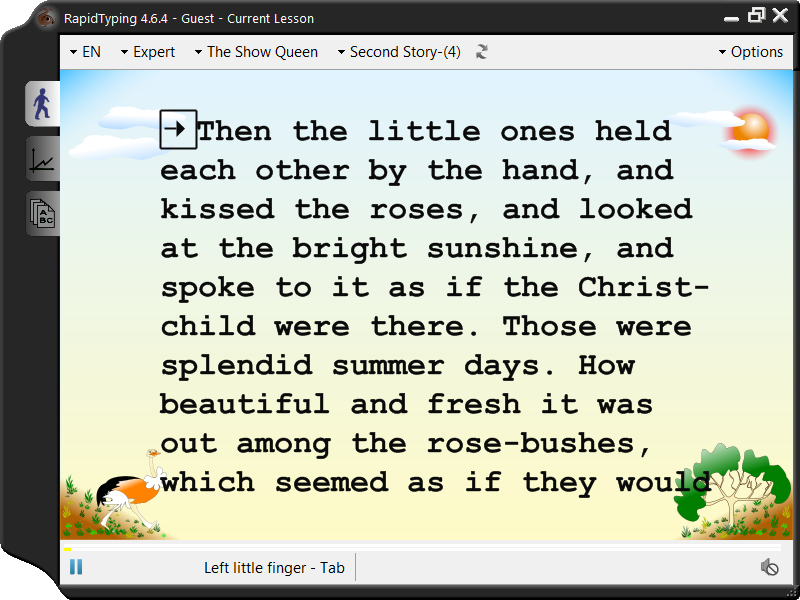
RapidTyping is a convenient and easy-to-use keyboard trainer that will help you improve your typing speed and reduce typos.
With its lessons organized around various keyboard groups, the RapidTyping software will teach you touch typing in a short time.
RapidTyping includes a virtual keyboard that will prompt which keys to press while you're making your way through the typing lessons. You can choose from three levels, which are Beginner, Advanced, and Expert.
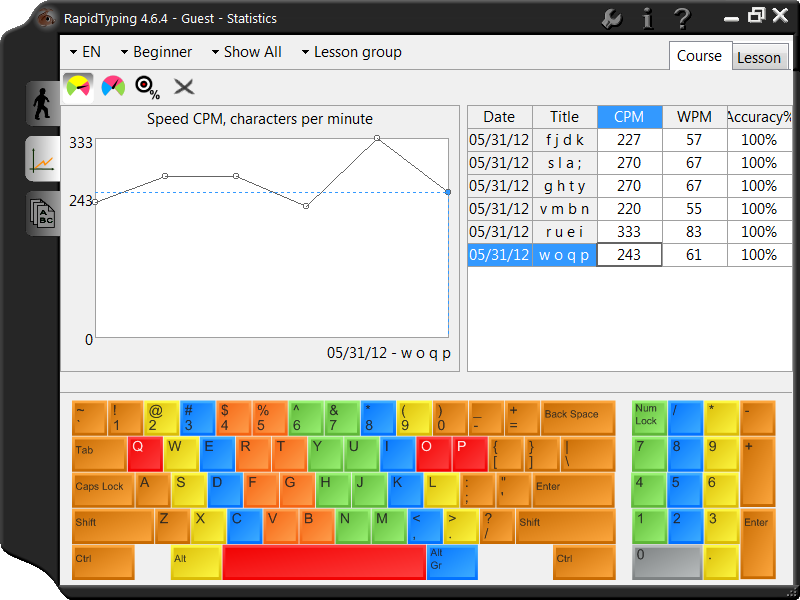
You can evaluate your own performance or that of your kids or students at any time by simply looking at charts.
Typing Tutor tracks your progress, and allows you to view your results at any time.
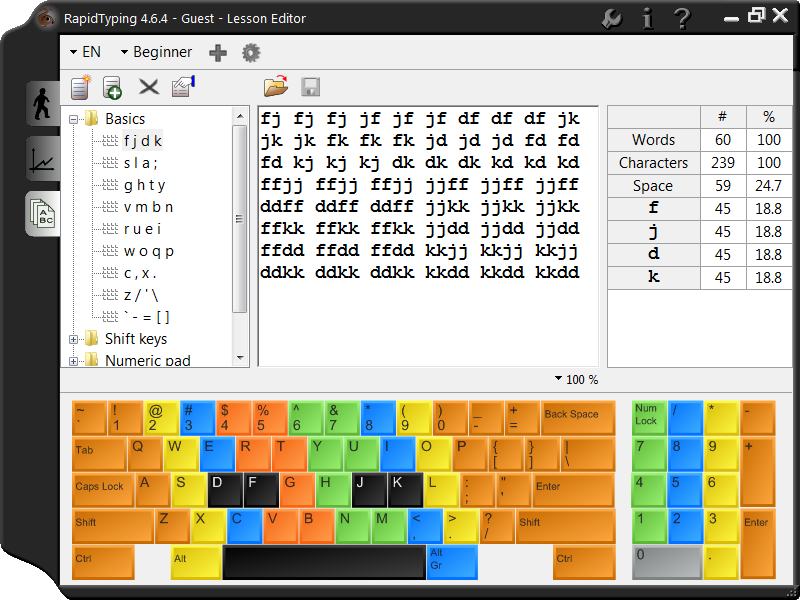
Lesson Editor makes all the lessons fully customizable. You can add, insert, change, and delete lessons, group them in courses, and review the corresponding metrics.
You can also install this tool on a local server in a classroom so that it can be easily run on each workstation via the network.
Portable Typing Tutor features:
- Possible for run without installation.
- All additions are included.
- Included all features the setup version.

System requirements:
  • RapidTyping supports: Windows 2000, XP, 2003, Vista, 2008, 7 and 8 (including all the 64-bit versions).
  • RapidTyping works on Linux and other x86-based Unixes, if you use Wine, and on Mac OS in the Parallel emulator or similar;
  • Minimum display area 680x420;
  • PC keyboard or touch-sensitive screen;
  • Display with more than 256-colors recommended (High Color);
  • 30-40 MB free hard drive space recommended;
  • 128 MB RAM memory available;
You may like the Previous Version of Rapid Typing Tutor 4 Download from link below-
1. Beta Version Click Here
2. Portable Version Click Here

TypeFaster Typing Tutor postheadericon


About TypeFaster:

This free typing tutor teaches you how to touch-type. Once you can touch-type you will not need to look at the keyboard to find the letters you want to type. The program comes in three versions: Standard, Accessible and Spanish. Use the menu on the left to navigate to the version you are interested in. Take a look at a screenshot. Free download of the fully functional standard version typing tutor at the bottom of this page.  

 Download TypeFaster-install.exe (1.81 MB)

Standard Version Features:

  • Supports multiple keyboard layouts and more can be added easily (see the developers section). Includes support for non-rectangular keys. The following keyboard layouts are currently supported:
    • Danish
    • Finnish
    • French
    • French-Belgian
    • German
    • Hebrew (no lesson files)
    • Italian
    • Norwegian
    • Numeric Keypad
    • Portuguese
    • Spanish
    • UK-English
    • US-Dvorak
    • US-English
  • A clear indication of which fingers to use. This is the essence of touchtyping.
  • A 3D typing game.
  • Typing statistics and the option of practising the least accurate/slowest/custom keys.
  • Keyboard is not a fixed size (resolution independent).
  • Multi-user support.
  • Teacher support (view student statistics).
  • Interface for editing lesson files and game settings.
  • Backspace support
  • Right to left text support.
  • Variable text size.
  • Lesson files can be prose or poems.
  • Lesson progress indicator.
  • Completely free with full source code availability.

Multi-user aspects of the Standard Version:

The version of TypeFaster Typing Tutor that is installed can be set when the installer is run.
Single-user This is for one user on one computer.
Multi-user This is for several users on one computer. For example, each of your family members can have their own login. The settings and progress of each user is stored.
Multi-user with teacher support This version is designed for use in a school. It must be installed in one place only, for example in a shared, writable network folder. Ideally in its own fairly small partition but with some space for new users. In this version there are two types of users: ordinary users and users with teacher privileges.
When ordinary users (pupils) login, they must select a teacher. The pupil will then get the lesson files that that teacher specified. So there should be a teacher's name for each different set of lesson files. An example of a teacher's login name is:
'Mr Smith'
If Mr Smith teaches typing to two different grades then he should create a different login for each grade, so for example, he could then create two users with teacher privileges:
'Mr Smith's Grade 8s' and
'Mr Smith's Grade 9s'
and give them different lesson files.
Download TypeFaster-install.exe (1.81 MB)

Sunday, September 14, 2014

KeyBlaze Typing Tutor Software postheadericon


The easiest typing tutor software available today for anyone
to quickly learn speed typing, 10-key and touch typing.

  • Perfect for people of all skill levels
  • Improve and test your typing speed and accuracy
  • Learn to type effectively and efficiently in no time
  • Improve your typing to improve your résumé 
Have fun improving your typing skills while playing games
Touch Typing Tutor Features
  • Typing lessons for home keys, neighbor keys, capitalization, punctuation, numbers and more
  • Practice exercises include drills, prose, poems and more
  • Typing games included, a fun way to improving typing skills
  • Dictation audio exercises for transcription practice
  • Initial skills test to determine current level
  • Test typing skills at various interval durations
  • Calculates net and gross words per minute WPM
  • Keyboard highlighting shows correct finger placement
  • Identify troublesome words & characters needing more practice
  • Import custom lessons, drills, and speed tests
  • Set personal words per minute speed goals
  • Printable course completion certificates
  • 10 key number pad lessons
  • Quick and easy operation