Thursday, November 27, 2014

Rufus USB bootable Maker postheadericon

  Create bootable USB drives the easy way 


>> Download <<

Last updated 2014.11.09:

Rufus is a utility that helps format and create bootable USB flash drives, such as USB keys/pendrives, memory sticks, etc.
It can be especially useful for cases where:
  • you need to create USB installation media from bootable ISOs (Windows, Linux, UEFI, etc.)
  • you need to work on a system that doesn't have an OS installed
  • you need to flash a BIOS or other firmware from DOS
  • you want to run a low-level utility
Despite its small size, Rufus provides everything you need!

System Requirements:
Windows XP or later, 32 or 64 bit doesn't matter. Once downloaded, the application is ready to use.
I will take this opportunity to express my gratitude to the translators who made it possible for Rufus, as well as this webpage, to be translated in various languages. If you find that you can use Rufus in your own language, you should really thank them!

Non exhaustive list of ISOs Rufus is known to work with & you can download ISO also.
Arch Linux Archbang BartPE/pebuilder CentOS Damn Small Linux Debian Fedora FreeDOS
Gentoo GParted gNewSense Hiren's Boot CD LiveXP Knoppix KolibriOS Kubuntu Linux Mint
NT Password Registry Editor OpenSUSE Parted Magic Partition Wizard Raspbian ReactOS
Red Hat rEFInd Slackware Tails Trinity Rescue Kit Ubuntu Ultimate Boot CD Windows XP (SP2+)
Windows Server 2003 R2 Windows Vista Windows 7 Windows 8 Windows 8.1 Windows 10


(Note: The owner & all credited of this software is www.rufus.akeo.ie)

Thursday, November 20, 2014

AVS Video Converter 9.0 postheadericon

Convert All Key Video Formats
Encode HD Video (inc. AVCHD, TS, TOD, AVI HD, M2TS, etc.), AVI, MP4, WMV, Blu-ray, 3GP, DVD, VOB, MPEG, H.263/H.264 codecs, DVR-MS, MKV, FLV, etc. with AVS Video Converter. See a full list of supported video formats

Manage HD-Camera Videos
Convert AVCHD, MPEG-2 HD, AVI HD, TOD/MOD, M2TS/MTS, etc. Edit HD-videos, add menus, subtitles, etc. and convert them to any video format supported by AVS Video Converter. Burn DVD/Blu-ray discs.


Convert Video for Various Devices
AVS Video Converter includes ready presets to convert video for iPhone, iPad, iPod Touch, Samsung, Android tablets, Sony PSP, Amazon Kindle, smartphones, portable media players, etc. See a full list of supported devices

Create Personal DVD/Blu-ray Videos
Convert from/to Blu-ray or DVD formats. Cut, apply effects, add colorful DVD/Blu-ray menus. Split your movie into chapters and burn DVD/Blu-ray discs with AVS Video Converter.

Presets for New Generation Devices
Convert your video to play it on iPhone 5S/5C, iPad 4/Air, Samsung Galaxy S4/ Galaxy Note 3/ Galaxy Note 10.1/ Galaxy Tab 3, Sony PS4.

Convert & Share Your Videos on Web
Convert video to FLV, F4V, etc. with AVS Video Converter. Create HTML pages with embedded FLV/F4V videos. Upload videos on your website, Facebook, Flickr, MySpace, etc.

Multilingual Support
AVS Video Converter interface and tech-support are available in English, French, German, Spanish, Italian, Japanese, Dutch, Korean, Polish, Danish and Russian.
See a full list of service utilities included into the installation.
 
Download AVS Video Converter Version:  9.0.1.566File Size:  60.88 MB

Platforms:  Windows 8.1, 8, 7, XP, 2003, Vista
(no Mac OS/Linux support)
 
All key formats are supported Read: HD Video (inc. Blu-ray video, AVCHD, MPEG-2 HD and WMV HD), AVI (DivX, Xvid, etc.), DV AVI, MP4 (inc. Apple iPad, Android tablets and Sony PSP), WMV, 3GP, 3G2, QuickTime (MOV, QT), DVD, VOB, VRO, MPEG-1, 2, 4, TOD, MOD, MPG, DAT, VCD, SVCD, Real Video (RM, RMVB), ASF, ASX, MJPEG, H.263, H.264, DVR-MS, MKV, OGM, FLV, F4V, AMV, MTV, TS, M2TS, M2T, MTS, DPG, NSV, FLI, FLC, CDG, PPT, GVI, TRP, GIF, WTV.

Write: HD Video (inc. Blu-ray video, MPEG-2 HD and WMV HD), AVI (DivX, Xvid, etc.), MP4 (inc. Sony PSP, Apple iPod and Archos), WMV, 3GP, 3G2, QuickTime (MOV, QT), SWF, FLV, F4V, DVD, MPEG-1, 2, 4, MPG, MJPEG, H.263, H.264, MKV, MPEG1 DPG, AMV, MTV, GIF, TS, M2TS.

(Note: This software owner and creditor is www.avs4you.com
 

AVS Disc Creator 5.2 postheadericon


Burn DVD Discs
Burn video files available on HDD directly on to a DVD disc with
AVS Disc Creator. All major media are supported: DVD+/-R, DVD+/-RW, DVD-RAM, Double/Dual Layer DVD, etc.


Write Blu-Ray Data
Write your data onto Blu-ray (BD-R, BD-RE) discs. Store your data in the highest quality due to the unique BD data capacity of 25 or 50 GB per disc.

Create Boot Discs
Create boot CD/DVD discs with AVS Disc Creator. Make a copy of your software to load and run an operating system or utility programs in case of emergency.

Make ISO Image
Create an image of your personal video and save it on PC. Or make an ISO image directly from a disc or HDD. Edit, delete or add new files in ready disc images made with AVS Disc Creator.

Support of Multiple Image File Formats
AVS Disc Creator supports a variety of image file formats such as Nero Burning-ROM image files, Alcohol 120% image files and so on. See a full list of supported disc image formats.

Multilingual Support
AVS Disc Creator interface and tech-support are available in English, French, German, Spanish, Italian,

Download AVS Disc Creator

Platforms:  Windows 8.1, 8, 7, XP, 2003, Vista
(no Mac OS/Linux support)
Support of Multiple Image Formats ICD, BIN, CUE, NRG, MDS, MDF, PDI, PDI01, PDI02, PDI03, PDI04, B5T, B5I, B6T, B6I, B00, B01, SUB, CCD, IMG, DAA, CDI, UIF, DVD, 000, 001, 002, 003, 004, XMD, XMF, DI, DI01A, DI01B, DI01C, DI01D, IBP, IBQ, IBQ01, IBQ02, IBQ03, P2I, RIF, C00, C01, C02, VaporCD, FCD, VCD, VDI, ASHDISC, VC4, NCD, DAT, C2D, BWT, BWI

(Note: This software owned & all credited by  www.avs4you.com)
 

AVS Audio Converter 7.3 postheadericon

Convert between All Key Audio Formats
Convert MP3, WMA, WAV, M4A, AMR, OGG, FLAC, MP2, etc. Manage APE files and encode them to any key audio format supported by AVS Audio Converter. See a full list of supported audio formats.
   

Export Audio from Video
Select and convert audio from your video files. supports DVD, MPEG, MP4, AVI, DIVX, MOV, WMV, VOB, 3GP, RM, QT, FLV, etc. See a full list of supported video formats.

Convert Files to M4B
Convert your audio tracks to M4B format with AVS Audio Converter. Divide them into chapters and add bookmarks. Set up quality level before audio conversion. Prepare audio files for your iPod/iPhone.
Create Ringtone for iPhone
Edit an audio file and save it to M4R format for iPhone. Make an individual ringtone with AVS Audio Converter.

Edit Your Audio Files
Trim, delete parts, merge files, apply effects with AVS Audio Converter. Modify extra text information in your audio files.

Multilingual Support
AVS Audio Converter interface and tech-support are available in English, French, German, Spanish, Italian, Japanese, Dutch, Polish and Russian.
See a full list of service utilities included into the installation.
Platforms:  Windows 8.1, 8, 7, XP, 2003, Vista
(no Mac OS/Linux support)
All key formats are supported Read: MP3, MPEG3, WMA, WAV, M4A, M4B, M4R, AAC, AMR, AWB, OGG, MP1, AC3, MP2, FLAC, AIFF, AIF, AIFC, AU, VOX, MPC, MP+, MKA, RAW, PCM, GSM, AVI, IVF, DIV, DIVX, MTV, AMV, MPG, MPEG, MOD, MPE, MVV, M2V, WMV, ASF, DVR-MS, DAT, IFO, VOB, VRO, M2TS, M2T, MTS, TOD, TS, TP, DV, MKV, OGM, OGV, OGA, OGX, RM, RMVB, RAM, IVR, MOV, QT, M4V, MP4, 3GP2, 3GPP, 3GP, 3G2, FLV, SWF, MID, MIDI, KAR, APE, QCP, MPA, RA, SHN, VOC

Write: MP3, WMA, WAV, M4A, M4B, M4R, AAC, AMR, AWB, OGG, MP2, FLAC


(Note: This software owned and all credited by www.avs4you.com )
 

AVS Audio Editor 7.3 postheadericon


Save Audio in All Key Formats
Edit and save audio files in MP3, FLAC, WAV, M4A, WMA, AAC, MP2, AMR, OGG, etc. with AVS Audio Editor. See a full list of audio formats.

Edit Audio
Cut, join, trim, mix, delete parts, split with AVS Audio Editor. Use Timeline for maximum precision. Use specially designed filters to remove irritating sounds like roaring, hissing, crackling, etc. 

Apply Audio Effects
Select between 20 built-in effects and filters including delay, flanger, chorus, reverb, and more. Mix audio and blend several audio tracks. AVS Audio Editor saves output files in any popular format.

Record Audio from Any Input
Record audio data from various inputs like microphone, vinyl records, and other input lines on a sound card. Edit recorded audio files, apply effects, save them in any key audio format.

Export Audio from Video
Extract and edit audio from your video files with AVS Audio Editor. Save them on PC or external hardware. See a full list of supported video formats.

Create Ringtone for iPhone
Edit an audio file and save it to M4R format for iPhone. Get a unique ringtone ready with AVS Audio Editor.

Multilingual Support
AVS Audio Editor interface and tech-support are available in English, French, German, Spanish, Italian, Japanese, Dutch, Polish and Russian.
See a full list of service utilities included into the installation.
Download AVS Audio Editor Version:  7.3.1.493File Size:  40.21 MB

(Thi software owner & all credited by www.avs4you.com)

Easy YouTube To Mp3 Converter postheadericon

An intuitive product for downloading and converting YouTube video to audio formats and saving to your hard disk - it is an awesome partner for MTVs and movies collectors to help with audio extraction work.

  • Provides wizard mode to guide the users, as it is a very easy and efficient way for all customers
  • Also can be used as an FLV/SWF to audio converter
  • Supports many popular output audio formats as WMA, MP3, WMA, OGG, AAC, M4A, FLAC and MP2
  • Easy to Use


Free Video To Audio Converter postheadericon

Completely free audio extractor for Windows

  • Free Video to Audio Converter is a powerful audio extractor extracting audio from video, like convert MPEG to MP3, convert MPEG to M4A, and AVI to MP3. The primary function of the video to audio converter is extracting audio from video files, such as convert AVI to MP3, and convert MPEG, WMV, MP4, MOV and RM to MP3 file. Moreover, Free Video to Audio Converter can convert among various audio formats as an audio converter.
  • Free Video to Audio Converter is an extremely easy-to-use audio extractor which can extract audio from video, convert MPEG to MP3, convert MPEG to M4A and AVI to MP3 with high conversion speed to give you the best quality.
  • Compared with other audio extractors, Free Video to Audio Converter supports so comprehensive video and audio formats like AVI, MPEG, GIF, Flash, MP4, WMV, MP3, WMA, WAV, M4A, AAC, and OGG, as well as APE/CUE decoding and audio CD ripping with lots of codecs.
  • With various settings and high conversion speed, Free Video to Audio Converter is Completely Free!
  • Supported formats:
    Input: AVI, 3GP, GIF, MPEG, WMV, MP4, DV, MOV, M4V, VOB (the video format used in DVD), SWF, NUT, RM, APE, CUE, 3G2, MP2, MP3, RA, WMA, WAV, M4A, AAC, OGG and CDA.
    Output: WMV, MP2, MP3, WMA, WAV, M4A, AAC, AC3, OGG and AU.
Download 100% free now

(This software owned and credited by www.free-audio-editor.com)

Free Audio Coverter postheadericon

Completely free audio converter for Windows

  • Sound file converter for Windows. Convert audio files from many different file formats to mp3, wav or wma. For example convert wav to mp3, mp3 to wav, wma to mp3 or many other formats. Just add the files you want to convert, select the output format, and then click convert.
  • Free Audio Converter is not simply an audio converter - it is the most comprehensive and stable sound file converter program around. You can convert your sound files into the formats you need to compress for storage, create ringtones, add to a presentation, listen on your portable device and much more. In fact, the possibilities are endless using this powerful audio converter.
  • Completely free!

Download 100% free Now


Free Audio Editor 2014 postheadericon

Completely free editor for windows. 
  • Superior Audio
  • Powerful Effects
  • Easy to Use
  • Completely Free
The complete Audio Recording/Editing package
   Download Here

The easy way to record, edit and enhance your sounds!

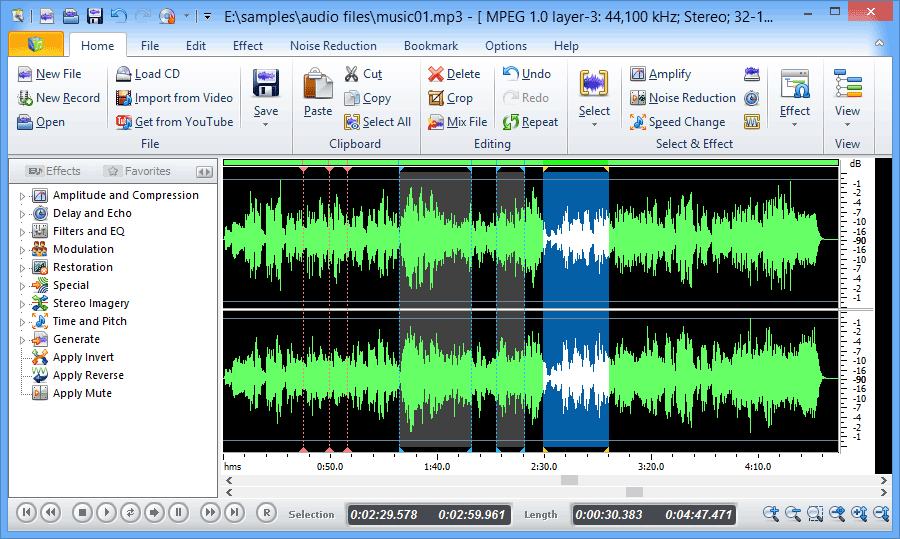
Edit audio files visually; Record audio from a microphone or any other available input device; Apply various effects; Burn audio CDs from MP3, WMA, WAV, and OGG; All in one program, simple and intuitive - FAE (free audio editor). Completely free!

10 fundamental reasons for using Free Audio Editor

  • Powerful audio recording feature
  • Edit audio files visually
  • Apply various effects easily
  • Powerful noise reduction tool
  • Easy to use interface will get you started editing in just minutes
  • Real-time effect preview is supported
  • Easy to use bookmark and region manager
  • Supports a number of file formats including wav (multiple codecs), mp3, wma, ogg and many more.
  • Burn your sound files to CD
  • Tools include speech synthesis (text-to-speech)
  • Completely Free! 
(The owner & all credited of this software www.free-audio-editor.com)

Edit your audio using Audacity® postheadericon

Audacity® is free, open source, cross-platform software for recording and editing sounds.


Download Audacity 2.0.6  for Windows 2000/XP/Vista/7/8

Improvements:
  • better user interface for Keyboard Preferences
  • streamlining of several Menus
  • LV2 now supported on all platforms, and improved VST settings interface
  • translations updated, including adding Tamil language
  • other improvements, including to import/export and ease of installation on Mac OS X
Bug Fixes:
  • user interface bug fixes to Region Restore, dragging selections, and many others
  • effects bug fixes to add missing effects to Chains, fix accuracy of Analyze > Contrast, fix accuracy of Noise Removal attack and decay, and improve speed of Nyquist effects on OS X and Linux
  • other bug fixes to Timeline after Loop Play, Transcription Toolbar, and Linux build issues
Screenshots
Audacity is available for Windows®, Mac®, GNU/Linux®; and other operating systems.