Sunday, November 30, 2014

Free Download Tearcopy for Faster Copy postheadericon


TeraCopy is a compact program designed to copy and move files at the maximum possible speed, providing the user a lot of features:

  • Copy files faster. TeraCopy uses dynamically adjusted buffers to reduce seek times. Asynchronous copy speeds up file transfer between two physical hard drives.
  • Pause and resume file transfers. Pause copy process at any time to free up system resources and continue with a single click.
  • Error recovery. In case of copy error, TeraCopy will try several times and in the worse case just skips the file, not terminating the entire transfer.
  • Interactive file list. TeraCopy shows failed file transfers and lets you fix the problem and recopy only problem files.
  • Shell integration. TeraCopy can completely replace Explorer copy and move functions, allowing you work with files as usual.
  • Full Unicode support

Free Driver Scout postheadericon

Free Driver Scout

The simple all-in-one driver software!

  • Scans for missing, corrupt or outdated drivers
  • Driver backup and restore function
  • Database for over 2 million devices


Download for free
Compatible with Windows8, Windows7, Vista, XP | 100% free | 100% spyware-free


The simple all-in-one driver software!
Windows upgrade, computer crash, new printer? Free Driver Scout helps you to quickly recover your Windows PC ready for use and solve system problems. Free Driver Scout is free software which updates your installed drivers. The tool will scan your PC for outdated, missing or faulty drivers and immediately offer you the latest version as a free download.

The top features at a glance

1-click maintenance
  1-click maintenance
  • practical 1-click maintenance to quickly and easily update all drivers
  •  Automatic scanning function which defines the timing and scope of    the scan
Driver scans


Driver scans
  • Find new device drivers quickly and safely
  • Manual scan of individual drivers which have already been installed

Download Manager 

Download Manager
  • List of all available driver updates
  • Download updates manually or automatically
  • Exclude individual units from the update
Backup and recoveryBackup and recovery
Other Features
  • Automatic backup of all drivers or
  • Manual backup of all drivers or
  • Manual backup of selected drivers
  • Restore selected backups


Other Features
  • Individually define memory location for driver backups and updates
  • Selectable memory location for driver updates
  • Multilingual user-interface

(Note: This software collected fromw ww.freemium.com )

Free Gaming Booster postheadericon

The secret of winning
  • The most efficient software to improve your gaming performance
  • Maintain and keep your PC clean and fast
  • No registration required, completely free of charge
Download for free
Compatible with Windows8, Windows7, Vista, XP | 100% free | 100% spyware-free

The boosting Software for PC lovers and gamers!

Getting the absolute best performance out of your system and games isn’t rocket science but it can sure be tough to figure out. Free Gaming Booster will automatically enhance the state of your system and focus all its resources purely for gaming. Free Gaming Booster is a free software simplifying the process of setting up your PC’s performance. This tool will configure and boost your PC, reducing the stress on your CPU and RAM.

This is how Free Gaming Booster works:

Click-MaintenanceClick-Maintenance

  • Click-Maintenance is the most important tools to manage and optimize your PC
  • individualize and schedule maintenance to automatically scan and repair your PC
  • Manage programs which run when you are playing


Clean Up & ManageClean Up & Manage

  • Clean up the registry to improve your PC’s performance
  • Compact the Windows files to speed up your computer
  • Monitor and optimize free memory in the background


(note: This software creditor and owner www.freemium.com )

Freemium Smart Tools Free System Utilities For PC postheadericon

Tuning software for your Windows® PC


  • 20 highly efficient tools to improve PC performance
  • includes registry cleaner, system speed up tool, uninstaller ...
  • no registration required, completely free of charge


Powerful tuning suite for your Windows® PC!

Free System Utilities is a completely free software, designed to maintain your Windows® PC. Version 1.0 provides you with 20 powerful tools to optimize the performance, safety and comfort of your PC, including all mayor functions of well-known system utility programs such as CCleaner, Revo Uninstaller Pro and Glary Utilities.

Download for free   For Windows8 / Windows7 / Vista / XP

4 categories of useful tools
1 Click-Maintenance 
1. Click-Maintenance:
  • one click will run the most important tools to manage and optimize your PC
  • 1 Click-Maintenance may be individualised
  • individulize and schedule maintenance to automatically scan and repair your PC
 

Cleanup & Manage 
2. Clean Up & Manage:
  • disc clean up through deleting objects in the recycle bin, temporary files, and 0 byte files
  • disc analysis with detailed information on used memory space
  • program analysis with convenient uninstall feature
  • and more.

Improve Performance 
3. Improve Performance:
  • registry clean up of erroneous entries
  • system memory optimization through deleting unused files
  • administration and speed up of system boot
  • administration and active controlling of running processes
  • and more.

Security and Privacy 
4. Security & Privacy:
  • securely delete data
  • erase internet traces that you leave behind after having used your PC
  • encryption and decryption of private data
  • and more.


Synei System Utilities postheadericon

The complete award winning care package for your PC! This
program will clean up, speed up, maintain, secure, and repair your system to make your PC run like brand new.
  • A click is all it takes to maximize your PC's speed.
  • Optimizes a variety of applications including: system, internet, browsers, games, applications, and much more.
  • Laptop users: Increases battery life! Less programs running in the background means more resources, speed, and battery life. 
  • Gamers: Reduces lag when playing games! Load games much quicker and smoother.
  • Choose between the Absolutely Free or Premiere Edition.

  Download Free Here

Performance
  • Completely speed up and secure your PC in 1 click.
  • Advanced System Optimization tactics to speed up your PC.
  • Ultimate Optimization to maximize your PC’s speed.
  • 10+ built in FREE PC tools at your finger tips.
  • 6+ Premiere PC tools to even further optimize your PC.
  • Use Turbo Mode to gain a huge speed boost
  • Deep Windows Registry cleaning to fix errors and speed up your PC.
Security
  • Protect your privacy by cleaning sensitive information such as tracking cookies.
  • Minimal protection to keep you safe from the internet.
  • Block malicious attempts to steal your personal Data.
  • Advanced protection to keep you safe from online threats such as Spyware. 


(Note: this software collected from http://www.synei.com)


Comodo System Utilities postheadericon

A powerful system cleaner that cleans all your files and registry while improving your privacy with our Safe Delete™ technology.

Ready to speed up your PC?
  Complete System cleaner + Registry cleaner = Comodo System Utilities


            Download Free Here 


 All-in-one system cleaner that will: 
  • Repair corrupt registry entries
  • Save space by deleting duplicates
  • Boost your PC by cleaning junk
  • Easy to use and schedule
  • Safely backup and restore
Comodo System Utilities is here to help you!
  • Windows registry cleaner identifies, removes or repairs any corrupted entries
  • Disk cleaner removes clutters to free up space and improve performance
  • Privacy cleaner deletes cookies, cache and history, protecting your privacy and identity
  • SafeDelete™ cleans deeply without removing something vital to your PC
System Requirements:
Windows XP/Vista/7/8 32 or 64 bit, 32 MB Ram and 20 MB Disk Space

(Note: This software collected from www.comodo.com)


Download WinZip System Utilities Suite postheadericon

To speed up your PC and make it run at peak performance, download WinZip System Utilities Suite!

  Download Free Here 

This complete set of 20+ easy-to-use PC tools is designed to clean, protect, and optimize your system.
    WinZip Courier
  • Clean your PC by removing junk data, duplicate files, and unwanted programs.
  • Protect your computer by resolving errors and permanently removing private data.
  • Optimize your computer system by cleaning the Windows registry, defragmenting your hard disk, and updating your device drivers.
Enjoy a faster, healthier PC with WinZip System Utilities Suite! 


(Note: All responsible and owner of this software  www.winzip.com )

Friday, November 28, 2014

Universal USB Installer – Easy as 1 2 3 postheadericon

Universal USB Installer aka UUI is a Live Linux USB Creator that allows you to choose from a selection of Linux Distributions to put on your USB Flash Drive. The Universal USB Installer is easy to use. Simply choose a Live Linux Distribution, the ISO file, your Flash Drive and, Click Install. Upon completion, you should have a ready to run bootable USB Flash Drive with your select operating system installed. Other features include; Persistence (if available) – note that casper persistence will only work with fat16 or fat32 formatted drives.

Universal USB Installer (UUI) Screenshots
Universal USB Installer Steps
Universal USB Installer - Progress Window
Universal-USB-Installer-1.9.5.8.exe – November 19, 2014 – Changes
Update to support Linux Lite
Download Universal-USB-Installer-1.9.5.8.exe
MD5: A53E9522CABCA72A4FC5199674B0D5ED
IMPORTANT NOTE: Your USB drive must be Fat16/Fat32/NTFS formatted, otherwise Syslinux will fail and your drive will NOT Boot.
Bootable USB Flash Drive Creation Requirements:
  • Universal-USB-Installer-1.9.5.8.exe
  • Windows XP/Vista/7/8 or WINE to create the USB (Win 98/2K WILL NOT Work!)
  • *Fat16, Fat32, or NTFS Formatted Flash Drive
  • PC with a BIOS that can boot from USB
  • Your Favorite Linux ISO
Feel free to inform me of unlisted Live Linux distributions or version revisions, and I will do my best to update UUI to support them.

Note: The owner and creditor http://www.pendrivelinux.com

Free WinISO Maker (WinISO 5.3) postheadericon

Free WinISO Maker (It's also named as Free ISO Maker & WinISO 5.3) is the first CD image file Editing tool in the world, which allows you to open, edit, create, extract, and convert ISO files, and make bootable ISO files. It can be served as Free ISO Maker, Free ISO Editor and Free ISO Converter. It can process almost all CD image files including ISO and BIN files. Free WinISO Maker is extensive enough to be used in just about every situation where you need a solution to managing your CD image files.
  • Free ISO Maker: Make ISO image file from CD Drive
  • Free ISO Converter: Convert image files between ISO / BIN and other formats
  • Free ISO Editor: Extract, edit, open, delete, add, rename ISO files directly
  • Free WinISO Maker can also make bootable image files

Features Overview

Free WinISO Maker screen02

Free WinISO Maker can edit the ISO file(s)

  • Open the ISO file and any other CD Disc image files
  • Add file(s) or folder(s) to the ISO file
  • Delete the file(s) or folder(s) from the ISO file
  • Rename the files in ISO file
  • View and run the files in ISO file
  • Reopen the image files you've opened
  • Extract files to your Pc
Free WinISO Maker screen01

Free WinISO Maker supports for creating the ISO file from CD.

  • Create ISO file from CD Drive
  • Create ISO file from floppy
Free WinISO Maker screen03

Free WinISO Maker is capable of converting ISO file(s) and other image files

  • Convert BIN/CUE to ISO
  • Convert ISO to BIN/CUE
  • Convert any other image files to the standard ISO formats.
Free WinISO Maker screen04

Free WinISO Maker is able to make bootable CD

  • Make bootable CD Disc image files
  • Support Bootable CD
  • Save bootable information to a bif/img file
System Requirement
  • Windows 95, Windows 98/98SE, Windows Me, Windows NT4, Windows 2000, Windows XP, Vista, Windows 7
  • CPU 1.0GHz above
  • 256MB memory
  • At least 100MB hard disk space
  • CD Drive (Optional)
 (Note: The owner and Creditor of this software is http://www.winiso.com.)

WinISO Standard 6 postheadericon

WinISO is a professional CD/DVD/Blu-ray Disc image file utility tool that you can open, create, edit, extract, mount, convert ISO files and other image file formats. It can also make bootable CD/DVD/BD and burn ISO image file to CD/DVD/Blu-ray Disc. Furthermore, it’s capable of processing almost all CD/DVD/BD image files, including ISO and BIN. WinISO provides a comprehensive solution. You can handle the ISO image files as you wish.
  • ISO Editor: Open and edit ISO files
  • ISO Extractor: Extract ISO files and CD/DVD/Blu-ray Disc image files
  • ISO Converter: Convert image files between ISO/BIN and other formats
  • ISO Burner: Burn ISO image file to CD/DVD/Blu-ray Disc and burn image files on-the-fly
  • ISO Mount: Mount ISO image files
  • Bootable ISO Maker: Make bootable CD/DVD/Blu-ray Disc images
  • Backup CD/DVD/BD as image files from CD/DVD/BD Drive 

WinISO is capable of creating the ISO file(s) from CD/DVD/Blu-ray Disc Drive and Hard Drive.

  • Create ISO/BIN/CCD/MDS/NRG file from CD/DVD Drive
  • Create ISO/BIN/CCD/MDS/NRG file from BD Drive
  • Create ISO file from Hard Drive
  • It can serve as ISO Creator
WinISO screen03

WinISO can also edit the ISO file(s)

  • Open the ISO file and any other CD/DVD/Blu-ray Disc image files
  • Add file(s) or folder(s) to the ISO file
  • Delete the file(s) or folder(s) from the ISO file
  • Rename the files in ISO file
  • View and run the files in ISO file
  • Extract files from ISO file and CD/DVD/BD image file
  • It is also a versatile ISO Editor
WinISO screen04

WinISO has ability to convert ISO file(s) and other image files

  • Convert BIN/CUE to ISO
  • Convert ISO to BIN/CUE
  • Convert ISO to MDS
  • Convert ISO to NRG
  • Convert ISO to CCD
  • Convert any other image files to the standard ISO formats.
  • It can be used as an extraordinary ISO Converter
WinISO screen02

Using WinISO as the bootable CD/DVD/Blu-ray Disc image file’s editor

  • Make CD/DVD/Blu-ray Disc bootable image files
  • Support Bootable CD/DVD/BD
  • Save bootable information to a bif/img file
  • Import a bif/img file to CD/DVD/Blu-ray Disc image file and make it bootable
  • It is an easy-to-use bootable ISO Maker
WinISO screen05

WinISO can burn ISO file to CD/DVD/Blu-ray Disc for your own needs

  • Burn the ISO image file to CD/DVD Disc
  • Burn the ISO image file to Blu-ray Disc
  • Supports burning image files on-the-fly
  • A fantastic ISO Burner with amazing burning speed.
WinISO screen06

WinISO can mount ISO image files

  • Mount the ISO image file to virtual drive
  • Supports mounting image files on-the-fly
  • It can also serve as a marvelous ISO Mount

System Requirement

  • Windows XP/ 2003/ Vista/ Windows 7/ Windows 8
  • CPU 1.0GHz above
  • 512MB memory
  • At least 100MB hard disk space
  • CD/DVD/Blu-ray Disc Drive (Optional)

Thursday, November 27, 2014

Rufus USB bootable Maker postheadericon

  Create bootable USB drives the easy way 


>> Download <<

Last updated 2014.11.09:

Rufus is a utility that helps format and create bootable USB flash drives, such as USB keys/pendrives, memory sticks, etc.
It can be especially useful for cases where:
  • you need to create USB installation media from bootable ISOs (Windows, Linux, UEFI, etc.)
  • you need to work on a system that doesn't have an OS installed
  • you need to flash a BIOS or other firmware from DOS
  • you want to run a low-level utility
Despite its small size, Rufus provides everything you need!

System Requirements:
Windows XP or later, 32 or 64 bit doesn't matter. Once downloaded, the application is ready to use.
I will take this opportunity to express my gratitude to the translators who made it possible for Rufus, as well as this webpage, to be translated in various languages. If you find that you can use Rufus in your own language, you should really thank them!

Non exhaustive list of ISOs Rufus is known to work with & you can download ISO also.
Arch Linux Archbang BartPE/pebuilder CentOS Damn Small Linux Debian Fedora FreeDOS
Gentoo GParted gNewSense Hiren's Boot CD LiveXP Knoppix KolibriOS Kubuntu Linux Mint
NT Password Registry Editor OpenSUSE Parted Magic Partition Wizard Raspbian ReactOS
Red Hat rEFInd Slackware Tails Trinity Rescue Kit Ubuntu Ultimate Boot CD Windows XP (SP2+)
Windows Server 2003 R2 Windows Vista Windows 7 Windows 8 Windows 8.1 Windows 10


(Note: The owner & all credited of this software is www.rufus.akeo.ie)

Thursday, November 20, 2014

AVS Video Converter 9.0 postheadericon

Convert All Key Video Formats
Encode HD Video (inc. AVCHD, TS, TOD, AVI HD, M2TS, etc.), AVI, MP4, WMV, Blu-ray, 3GP, DVD, VOB, MPEG, H.263/H.264 codecs, DVR-MS, MKV, FLV, etc. with AVS Video Converter. See a full list of supported video formats

Manage HD-Camera Videos
Convert AVCHD, MPEG-2 HD, AVI HD, TOD/MOD, M2TS/MTS, etc. Edit HD-videos, add menus, subtitles, etc. and convert them to any video format supported by AVS Video Converter. Burn DVD/Blu-ray discs.


Convert Video for Various Devices
AVS Video Converter includes ready presets to convert video for iPhone, iPad, iPod Touch, Samsung, Android tablets, Sony PSP, Amazon Kindle, smartphones, portable media players, etc. See a full list of supported devices

Create Personal DVD/Blu-ray Videos
Convert from/to Blu-ray or DVD formats. Cut, apply effects, add colorful DVD/Blu-ray menus. Split your movie into chapters and burn DVD/Blu-ray discs with AVS Video Converter.

Presets for New Generation Devices
Convert your video to play it on iPhone 5S/5C, iPad 4/Air, Samsung Galaxy S4/ Galaxy Note 3/ Galaxy Note 10.1/ Galaxy Tab 3, Sony PS4.

Convert & Share Your Videos on Web
Convert video to FLV, F4V, etc. with AVS Video Converter. Create HTML pages with embedded FLV/F4V videos. Upload videos on your website, Facebook, Flickr, MySpace, etc.

Multilingual Support
AVS Video Converter interface and tech-support are available in English, French, German, Spanish, Italian, Japanese, Dutch, Korean, Polish, Danish and Russian.
See a full list of service utilities included into the installation.
 
Download AVS Video Converter Version:  9.0.1.566File Size:  60.88 MB

Platforms:  Windows 8.1, 8, 7, XP, 2003, Vista
(no Mac OS/Linux support)
 
All key formats are supported Read: HD Video (inc. Blu-ray video, AVCHD, MPEG-2 HD and WMV HD), AVI (DivX, Xvid, etc.), DV AVI, MP4 (inc. Apple iPad, Android tablets and Sony PSP), WMV, 3GP, 3G2, QuickTime (MOV, QT), DVD, VOB, VRO, MPEG-1, 2, 4, TOD, MOD, MPG, DAT, VCD, SVCD, Real Video (RM, RMVB), ASF, ASX, MJPEG, H.263, H.264, DVR-MS, MKV, OGM, FLV, F4V, AMV, MTV, TS, M2TS, M2T, MTS, DPG, NSV, FLI, FLC, CDG, PPT, GVI, TRP, GIF, WTV.

Write: HD Video (inc. Blu-ray video, MPEG-2 HD and WMV HD), AVI (DivX, Xvid, etc.), MP4 (inc. Sony PSP, Apple iPod and Archos), WMV, 3GP, 3G2, QuickTime (MOV, QT), SWF, FLV, F4V, DVD, MPEG-1, 2, 4, MPG, MJPEG, H.263, H.264, MKV, MPEG1 DPG, AMV, MTV, GIF, TS, M2TS.

(Note: This software owner and creditor is www.avs4you.com
 

AVS Disc Creator 5.2 postheadericon


Burn DVD Discs
Burn video files available on HDD directly on to a DVD disc with
AVS Disc Creator. All major media are supported: DVD+/-R, DVD+/-RW, DVD-RAM, Double/Dual Layer DVD, etc.


Write Blu-Ray Data
Write your data onto Blu-ray (BD-R, BD-RE) discs. Store your data in the highest quality due to the unique BD data capacity of 25 or 50 GB per disc.

Create Boot Discs
Create boot CD/DVD discs with AVS Disc Creator. Make a copy of your software to load and run an operating system or utility programs in case of emergency.

Make ISO Image
Create an image of your personal video and save it on PC. Or make an ISO image directly from a disc or HDD. Edit, delete or add new files in ready disc images made with AVS Disc Creator.

Support of Multiple Image File Formats
AVS Disc Creator supports a variety of image file formats such as Nero Burning-ROM image files, Alcohol 120% image files and so on. See a full list of supported disc image formats.

Multilingual Support
AVS Disc Creator interface and tech-support are available in English, French, German, Spanish, Italian,

Download AVS Disc Creator

Platforms:  Windows 8.1, 8, 7, XP, 2003, Vista
(no Mac OS/Linux support)
Support of Multiple Image Formats ICD, BIN, CUE, NRG, MDS, MDF, PDI, PDI01, PDI02, PDI03, PDI04, B5T, B5I, B6T, B6I, B00, B01, SUB, CCD, IMG, DAA, CDI, UIF, DVD, 000, 001, 002, 003, 004, XMD, XMF, DI, DI01A, DI01B, DI01C, DI01D, IBP, IBQ, IBQ01, IBQ02, IBQ03, P2I, RIF, C00, C01, C02, VaporCD, FCD, VCD, VDI, ASHDISC, VC4, NCD, DAT, C2D, BWT, BWI

(Note: This software owned & all credited by  www.avs4you.com)
 

AVS Audio Converter 7.3 postheadericon

Convert between All Key Audio Formats
Convert MP3, WMA, WAV, M4A, AMR, OGG, FLAC, MP2, etc. Manage APE files and encode them to any key audio format supported by AVS Audio Converter. See a full list of supported audio formats.
   

Export Audio from Video
Select and convert audio from your video files. supports DVD, MPEG, MP4, AVI, DIVX, MOV, WMV, VOB, 3GP, RM, QT, FLV, etc. See a full list of supported video formats.

Convert Files to M4B
Convert your audio tracks to M4B format with AVS Audio Converter. Divide them into chapters and add bookmarks. Set up quality level before audio conversion. Prepare audio files for your iPod/iPhone.
Create Ringtone for iPhone
Edit an audio file and save it to M4R format for iPhone. Make an individual ringtone with AVS Audio Converter.

Edit Your Audio Files
Trim, delete parts, merge files, apply effects with AVS Audio Converter. Modify extra text information in your audio files.

Multilingual Support
AVS Audio Converter interface and tech-support are available in English, French, German, Spanish, Italian, Japanese, Dutch, Polish and Russian.
See a full list of service utilities included into the installation.
Platforms:  Windows 8.1, 8, 7, XP, 2003, Vista
(no Mac OS/Linux support)
All key formats are supported Read: MP3, MPEG3, WMA, WAV, M4A, M4B, M4R, AAC, AMR, AWB, OGG, MP1, AC3, MP2, FLAC, AIFF, AIF, AIFC, AU, VOX, MPC, MP+, MKA, RAW, PCM, GSM, AVI, IVF, DIV, DIVX, MTV, AMV, MPG, MPEG, MOD, MPE, MVV, M2V, WMV, ASF, DVR-MS, DAT, IFO, VOB, VRO, M2TS, M2T, MTS, TOD, TS, TP, DV, MKV, OGM, OGV, OGA, OGX, RM, RMVB, RAM, IVR, MOV, QT, M4V, MP4, 3GP2, 3GPP, 3GP, 3G2, FLV, SWF, MID, MIDI, KAR, APE, QCP, MPA, RA, SHN, VOC

Write: MP3, WMA, WAV, M4A, M4B, M4R, AAC, AMR, AWB, OGG, MP2, FLAC


(Note: This software owned and all credited by www.avs4you.com )
 

AVS Audio Editor 7.3 postheadericon


Save Audio in All Key Formats
Edit and save audio files in MP3, FLAC, WAV, M4A, WMA, AAC, MP2, AMR, OGG, etc. with AVS Audio Editor. See a full list of audio formats.

Edit Audio
Cut, join, trim, mix, delete parts, split with AVS Audio Editor. Use Timeline for maximum precision. Use specially designed filters to remove irritating sounds like roaring, hissing, crackling, etc. 

Apply Audio Effects
Select between 20 built-in effects and filters including delay, flanger, chorus, reverb, and more. Mix audio and blend several audio tracks. AVS Audio Editor saves output files in any popular format.

Record Audio from Any Input
Record audio data from various inputs like microphone, vinyl records, and other input lines on a sound card. Edit recorded audio files, apply effects, save them in any key audio format.

Export Audio from Video
Extract and edit audio from your video files with AVS Audio Editor. Save them on PC or external hardware. See a full list of supported video formats.

Create Ringtone for iPhone
Edit an audio file and save it to M4R format for iPhone. Get a unique ringtone ready with AVS Audio Editor.

Multilingual Support
AVS Audio Editor interface and tech-support are available in English, French, German, Spanish, Italian, Japanese, Dutch, Polish and Russian.
See a full list of service utilities included into the installation.
Download AVS Audio Editor Version:  7.3.1.493File Size:  40.21 MB

(Thi software owner & all credited by www.avs4you.com)

Easy YouTube To Mp3 Converter postheadericon

An intuitive product for downloading and converting YouTube video to audio formats and saving to your hard disk - it is an awesome partner for MTVs and movies collectors to help with audio extraction work.

  • Provides wizard mode to guide the users, as it is a very easy and efficient way for all customers
  • Also can be used as an FLV/SWF to audio converter
  • Supports many popular output audio formats as WMA, MP3, WMA, OGG, AAC, M4A, FLAC and MP2
  • Easy to Use


Free Video To Audio Converter postheadericon

Completely free audio extractor for Windows

  • Free Video to Audio Converter is a powerful audio extractor extracting audio from video, like convert MPEG to MP3, convert MPEG to M4A, and AVI to MP3. The primary function of the video to audio converter is extracting audio from video files, such as convert AVI to MP3, and convert MPEG, WMV, MP4, MOV and RM to MP3 file. Moreover, Free Video to Audio Converter can convert among various audio formats as an audio converter.
  • Free Video to Audio Converter is an extremely easy-to-use audio extractor which can extract audio from video, convert MPEG to MP3, convert MPEG to M4A and AVI to MP3 with high conversion speed to give you the best quality.
  • Compared with other audio extractors, Free Video to Audio Converter supports so comprehensive video and audio formats like AVI, MPEG, GIF, Flash, MP4, WMV, MP3, WMA, WAV, M4A, AAC, and OGG, as well as APE/CUE decoding and audio CD ripping with lots of codecs.
  • With various settings and high conversion speed, Free Video to Audio Converter is Completely Free!
  • Supported formats:
    Input: AVI, 3GP, GIF, MPEG, WMV, MP4, DV, MOV, M4V, VOB (the video format used in DVD), SWF, NUT, RM, APE, CUE, 3G2, MP2, MP3, RA, WMA, WAV, M4A, AAC, OGG and CDA.
    Output: WMV, MP2, MP3, WMA, WAV, M4A, AAC, AC3, OGG and AU.
Download 100% free now

(This software owned and credited by www.free-audio-editor.com)

Free Audio Coverter postheadericon

Completely free audio converter for Windows

  • Sound file converter for Windows. Convert audio files from many different file formats to mp3, wav or wma. For example convert wav to mp3, mp3 to wav, wma to mp3 or many other formats. Just add the files you want to convert, select the output format, and then click convert.
  • Free Audio Converter is not simply an audio converter - it is the most comprehensive and stable sound file converter program around. You can convert your sound files into the formats you need to compress for storage, create ringtones, add to a presentation, listen on your portable device and much more. In fact, the possibilities are endless using this powerful audio converter.
  • Completely free!

Download 100% free Now


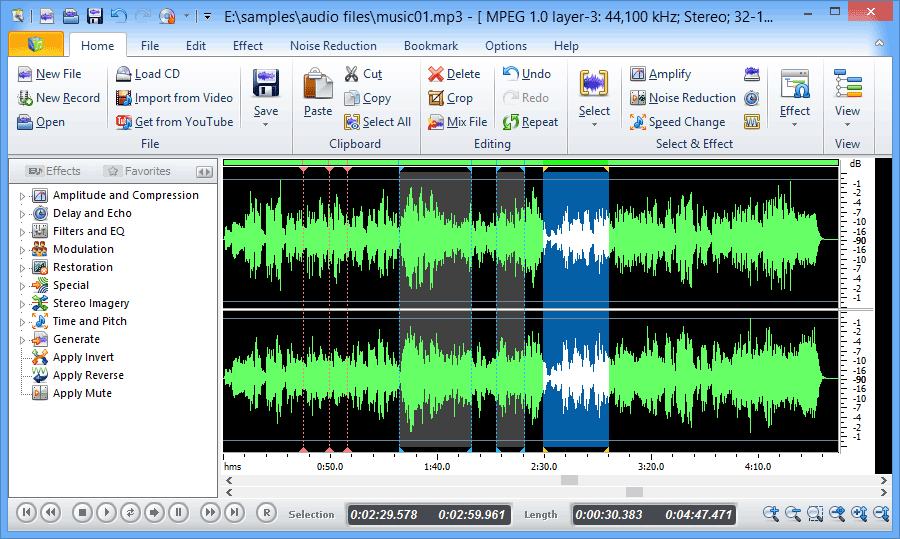
Free Audio Editor 2014 postheadericon

Completely free editor for windows. 
  • Superior Audio
  • Powerful Effects
  • Easy to Use
  • Completely Free
The complete Audio Recording/Editing package
   Download Here

The easy way to record, edit and enhance your sounds!

Edit audio files visually; Record audio from a microphone or any other available input device; Apply various effects; Burn audio CDs from MP3, WMA, WAV, and OGG; All in one program, simple and intuitive - FAE (free audio editor). Completely free!

10 fundamental reasons for using Free Audio Editor

  • Powerful audio recording feature
  • Edit audio files visually
  • Apply various effects easily
  • Powerful noise reduction tool
  • Easy to use interface will get you started editing in just minutes
  • Real-time effect preview is supported
  • Easy to use bookmark and region manager
  • Supports a number of file formats including wav (multiple codecs), mp3, wma, ogg and many more.
  • Burn your sound files to CD
  • Tools include speech synthesis (text-to-speech)
  • Completely Free! 
(The owner & all credited of this software www.free-audio-editor.com)

Edit your audio using Audacity® postheadericon

Audacity® is free, open source, cross-platform software for recording and editing sounds.


Download Audacity 2.0.6  for Windows 2000/XP/Vista/7/8

Improvements:
  • better user interface for Keyboard Preferences
  • streamlining of several Menus
  • LV2 now supported on all platforms, and improved VST settings interface
  • translations updated, including adding Tamil language
  • other improvements, including to import/export and ease of installation on Mac OS X
Bug Fixes:
  • user interface bug fixes to Region Restore, dragging selections, and many others
  • effects bug fixes to add missing effects to Chains, fix accuracy of Analyze > Contrast, fix accuracy of Noise Removal attack and decay, and improve speed of Nyquist effects on OS X and Linux
  • other bug fixes to Timeline after Loop Play, Transcription Toolbar, and Linux build issues
Screenshots
Audacity is available for Windows®, Mac®, GNU/Linux®; and other operating systems.